In this tutorial you will learn how to manage taxes in Jigoshop.
Login to WordPress Admin panel and go to Jigoshop -> Settings -> Tax.
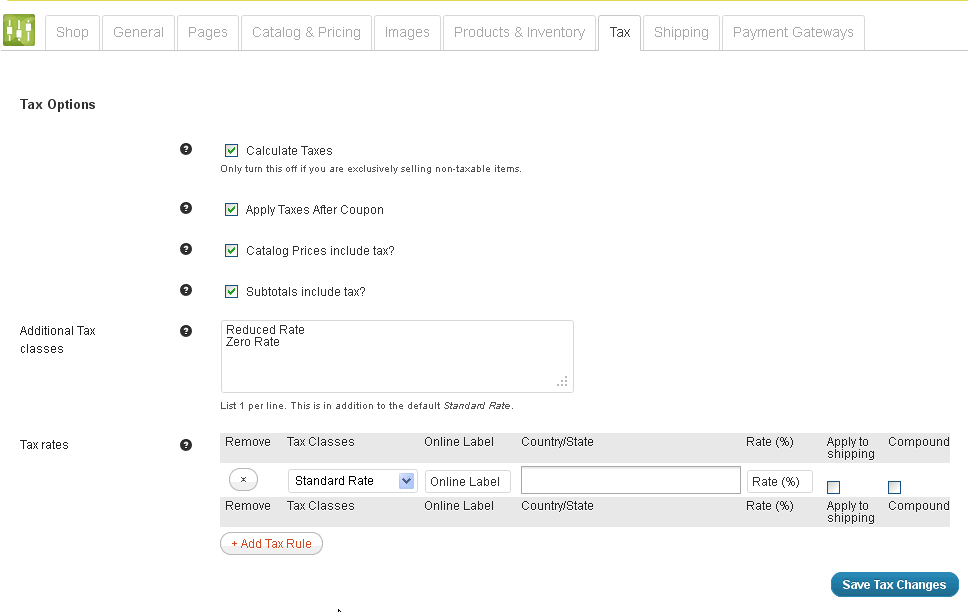
In order to add Tax, click Add Tax Rule button.
Specify Tax Class, Online Label, choose Country/State for which this particular tax will be applied and tax rate.
We may also adjust Tax Options
Calculate Taxes
If you are not calculating taxes then you can ignore all other tax options.
Apply Taxes After Coupon
If enabled, taxes get applied after coupons. Otherwise, taxes get applied before coupons.
Catalog Prices include tax?
If prices include tax then tax calculations will work backwards.
Subtotals include tax?
Should any subtotals be shown including or excluding tax on the Cart and Checkout? This will include Shipping subtotals.
Feel free to check the detailed video tutorial below: