Язык

  • English
  • Español
  • Russian

Top Menu

  • Live Chat
  • Submit a ticket
  • Sample Templates
  • Contact Us
 

Knowledgebase and documentation
If you have TEMPLATE-HELP.COM on your cardholder's statement and don't recognize it, please contact billing@template-help.com
  • Web templates
    • 3 Color Templates
      • Product Description
      • Tutorials
    • CSS Templates
      • Product Description
      • Tutorials
    • Dynamic Flash
      • Product Description
      • Tutorials
    • Dynamic Flash Photo Gallery
      • Product Description
      • Tutorials
      • Updates & Innovations
    • Flash Animated Templates
      • Product Description
      • Tutorials
    • Flash CMS Intro
      • Product Description
      • Tutorials
    • Flash Intro Templates
      • Product Description
      • Tutorials
    • Flash Templates
      • Product Description
      • Quick Guide
      • Tutorials
    • Dynamic SWISH Templates
      • Product Description
      • Tutorials
    • Full Package Templates
      • Product Description
      • Tutorials
    • Full Site templates
      • Product Description
      • Quick Guide
      • Tutorials
    • JS Animated
      • Tutorials
    • PSD Templates
      • Product Description
      • Tutorials
    • Razor Templates
      • Product Description
    • Stretched Template
      • Product Description
      • Tutorials
    • SWISH Animated templates
      • Product Description
      • Tutorials
    • Swish Templates
      • Product Description
      • Tutorials
    • XML Flash Templates
      • Product Description
      • Tutorials
    • PRO templates
      • Product Description
    • Responsive web templates
      • Product Description
  • E-commerce Templates
    • CRE Loaded
      • Product Description
      • Tutorials
      • Updates & Innovations
    • Magento
      • Product Description
      • Quick Guide
      • Tutorials
      • Updates & Innovations
    • OpenCart
      • Tutorials
      • Updates and Innovations
    • OsCommerce
      • Product Description
      • Quick Guide
      • Tutorials
      • Updates & Innovations
    • Prestashop
      • Product Description
      • Quick Guide
      • Tutorials
      • Updates & Innovations
    • VirtueMart
      • Product Description
      • Quick Guide
      • Tutorials
      • Updates & Innovations
    • ZenCart
      • Product Description
      • Quick Guide
      • Tutorials
      • Updates & Innovations
    • E-Commerce Comparison
    • E-commerce templates compatibility table
  • CMS & Blog Templates
    • Drupal
      • Product Description
      • Quick Guide
      • Tutorials
      • Updates & Innovations
    • Joomla!
      • Product Description
      • Quick Guide
      • Tutorials
      • Updates & Innovations
    • Mambo
      • Product Description
    • PhpBB
      • Product Description
      • Tutorials
    • Php-Nuke
      • Product Description
      • Tutorials
    • Tumblr templates
      • Tutorials
    • Wordpress
      • Product Description
      • Quick Guide
      • Tutorials
      • Updates & Innovations
    • CMS Product versions compatibility
  • Corporate Design
    • Corporate Identity
      • Product Description
      • Tutorials
    • Icon Set
      • Product Description
      • Tutorials
    • Logo Set
      • Product Description
      • Tutorials
    • Logo Templates
      • Product Description
      • Tutorials
    • PowerPoint Templates
      • Product Description
      • Tutorials
  • Silverlight
    • Silverlight Templates
      • Product Description
      • Tutorials
    • Silverlight Intro
      • Product Description
  • Video Templates
    • After Effects Intros
      • Product Description
      • Tutorials
    • After Effects Logo Reveals
      • Product Description
      • Tutorials
    • VideoSmash
      • Tutorials
  • Facebook Layouts
    • Facebook Flash Templates
      • Product Description
      • Tutorials
    • Facebook HTML Templates
      • Tutorials
    • Facebook Reveal Template
      • Tutorials
    • Updates & Innovations
 

Pre-Sale Questions

  • Pre-Sale Questions
    • Pre-Sale FAQ
    • After Sale Support
    • Copyright & Template Usage
    • Licensing Questions
  • Billing Questions
 

General Tutorials

  • Developer Tools
  • Hosting FAQ
  • Working with CSS
  • Working with Photoshop
  • Working with HTML
  • Working with Files
  • Working with Flash
  • Working with JQuery
  • Working with fonts
  • Working with XML Flash
  • Working with Swish
 

OpenCart. Как отредактировать логотип

  • Author: admin
  • Posted on: Апрель 24, 2012
  • Relation: Administer
  • Complexity: Average
  • Метки: edit, logo, opencart
GD Star Rating
a WordPress rating system
 

В этой инструкции вы узнаете, как отредактировать логотип в вашем шаблоне OpenCart.

1) Для изменения логотипа вам потребуется отредактировать PSD файл с помощью Adobe Photoshop. PSD файлы находятся в папке sources/psd.

2) Откройте его с помощью Adobe Photoshop. Отредактируйте логотип. Теперь потребуется сохранить логотип.

3) Воспользуйтесь инструкцией Как сохранять для web в которой есть подробные пояснения, как это сделать.

4) Теперь нам потребуется загрузить новый логотип.

5) Войдите в административную панель OpenCart. Для этого введите в адресной строке браузера your_domain_name/admin

6) Введите ваше имя пользователя и пароль

7) В верхнем меню выберите System -> Settings и нажмите кнопку Edit.

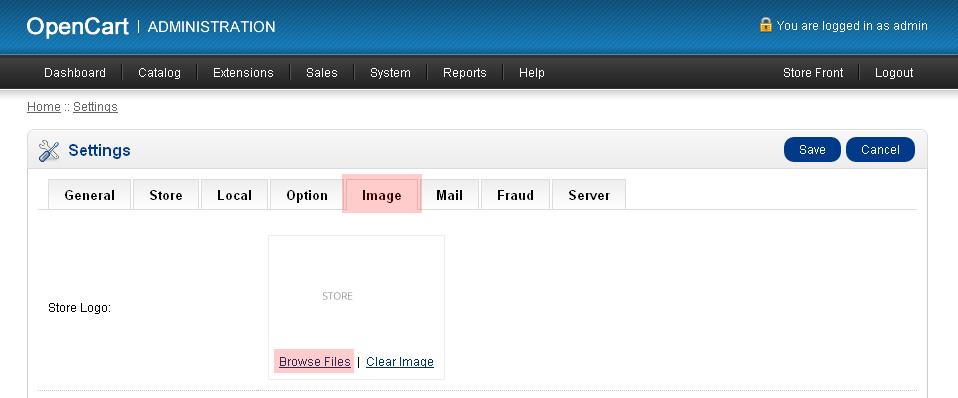
8) Перейдите на вкладку Image. Тут мы сможем изменить логотип магазина. С помощью кнопки Browse Files загрузите новый логотип.
9) Нажмите кнопку Upload.
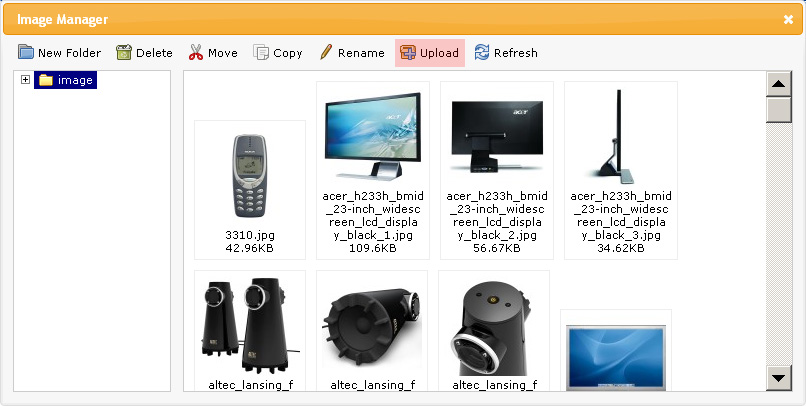
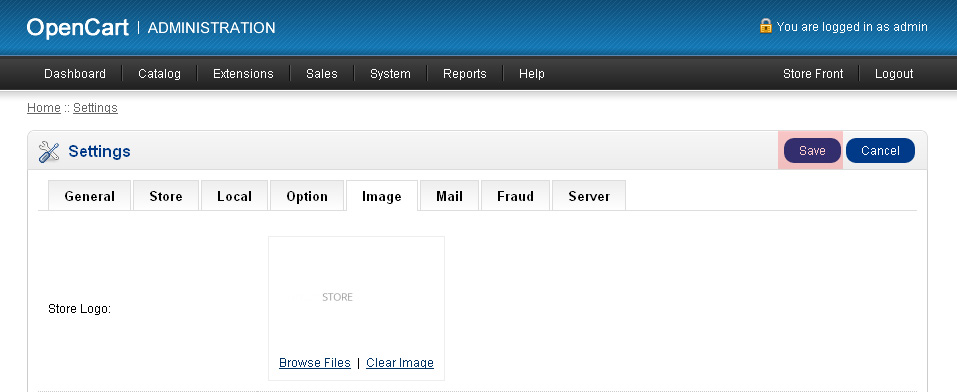
10) Выберите изображение для загрузки. Вы должны увидеть сообщение о завершении загрузки. Найдите его в списке и сделайте на нем двойной клик для выбора и сохраните изменения.
11) Обновите страницы вашего сайта в браузере для просмотра нового логотипа.

Посмотрите подробную видеоинструкцию:

OpenCart. Как изменить логотип

This entry was posted in OpenCart Tutorials and tagged edit, logo, opencart. Bookmark the permalink.

Related posts:

  1. OpenCart. Как управлять категориями
  2. OpenCart. Как управлять продуктами
  3. OpenCart. Как отредактировать страницу Contact us.
  4. OpenCart. Как установить шаблон
  5. (English) It’s time to say welcome to OpenCart e-commerce solution.

Submit a ticket

Если вы не смогли найти подходящее решение проблемы, пожалуйста воспользуйтесь следующей ссылкой, чтобы отправить запрос команде технической поддержки.
Отправить запросВы получите ответ в течение 24 часов

Copyright 2003-2012 Template-help.com All rights reserved.