
Just Host Web Hosting Help
DNS MX Record Modification
The MX Record of a domain can be changed easily through the cPanel. We have created our own DNS Editor to allow you to easily make this change.
Modifying an MX Entry:
Login to your Just Host Control Panel.
Select the "DNS Zone Editor" icon in the Domains section.
Select the domain you're modifying from the drop-down box.
Scroll down to the heading named "Add DNS Record"
In the "Host Record"field, enter the domain you're modifying. In most cases, you'll simply type your domain name here, without www.
Leave the "TTL"field at it's default setting
Select "MX" from the drop-down box labelled "Type"
In the "Points To" field, enter the necessary address.
The "Priority" field dictates the order in which the MX entries are applied. Please refer to your MX entry provider for proper settings here.
Select "Add Record" to finish the process.
Changed your MX record and can not receive any email at the mail server?
If you ever send mail from any domain that is on the same host server as the domain you are sending mail to, your external mail server will not receive the mail.
The reason for this is that a server will always try to send locally before it tries what the actual DNS or MX zone points to. In order to correct this you will need to adjust the MX routing settings to local.
- From your cPanel, go to the MX entry icon.
- Choose your domain from the drop down box that you are wanting to change the MX settings on
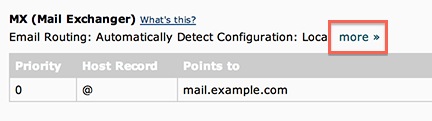
- Scroll down to MX (Mail Exchanger) and click the more link to expand the section.
- Choose between Automatically Detect Configuration or Local Mail Exchanger.
- Click Change
If manually toggling your MX setting does not work, contact Just Host via live chat, phone or ticket and request to remove your affected domain from "/etc/localdomains" and add it to "/etc/remotedomains." Once the change is done, the problem should be fixed.
 116,705 views
 bookmark
 share
share
 E-mail
 Twitter
 Google Bookmarks
 Facebook
 MySpace
 Digg
Digg Reddit
 Delicious
 LinkedIn
 StumbleUpon
 tags:
tags: