
Just Host Web Hosting Help
How to host the Primary Domain from a subfolder (.htaccess)
Summary
Locating the .htaccess file in the File Manager
- Log in to the Just Host cPanel.
- Scroll down to the Files section.
- Click the File Manager icon.

- Check the
View Hidden Files
checkbox.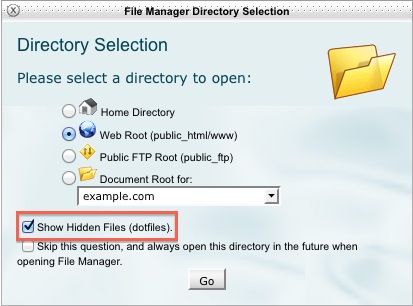
- You are working with your primary domain, so select the
WebRoot (public_html/www)
option.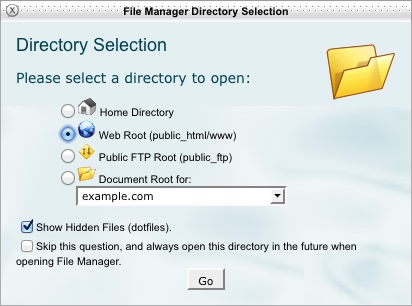
- Right click the
.htaccess
and choose Code Editor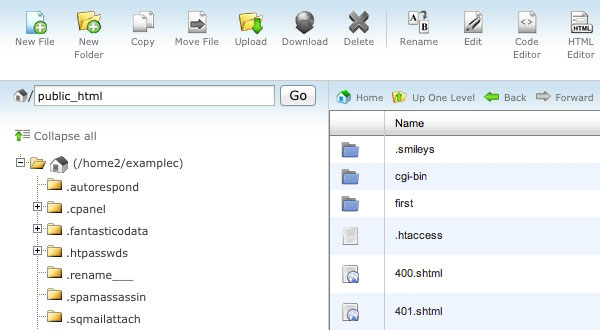
Modifying the .htaccess
You will want to insert the following code block and make modifications as noted in the (#) comments. You will need to change the two instances of example.com
to your domain, and the three instances of subdirectory
to the folder where you want your site.
# Justhost.com
        # .htaccess main domain to subdirectory redirect
        # Copy and paste the following code into the .htaccess file
        # in the public_html folder of your hosting account
        # make the changes to the file according to the instructions.
        # Do not change this line.
        RewriteEngine on
        # Change example.com to be your main domain.
        RewriteCond %{HTTP_HOST} ^(www.)?example.com$
        # Change 'subdirectory' to be the directory you will use for your main domain.
        RewriteCond %{REQUEST_URI} !^/subdirectory/
        # Don't change these line.
        RewriteCond %{REQUEST_FILENAME} !-f
        RewriteCond %{REQUEST_FILENAME} !-d
        # Change 'subdirectory' to be the directory you will use for your main domain.
        RewriteRule ^(.*)$ /subdirectory/$1
        # Change example.com to be your main domain again.
        # Change 'subdirectory' to be the directory you will use for your main domain
        # followed by / then the main file for your site, index.php, index.html, etc.
        RewriteCond %{HTTP_HOST} ^(www.)?example.com$
        RewriteRule ^(/)?$ subdirectory/index.html [L]
Visitors to your Web site will not be able to tell that your main domain is using a subdirectory, they will still see the Web site address as http://www.example.com/page.html.
Note: This will not work with some website software. You will also need to modify the $base_url
, $live_site
or other configuration settings in those to finish the process.
When using WordPress
When you are using WordPress it is recommended that you follow their instructions found in the WordPress codex, Giving WordPress Its Own Directory
 bookmark
 share
share
 E-mail
 Twitter
 Google Bookmarks
 Facebook
 MySpace
 Digg
Digg Reddit
 Delicious
 LinkedIn
 StumbleUpon
Recommended Help Content
 64,441 views
 tags: accessible addon directory domain folders hidden htaccess inaccessible primary secondary
Related Help Content
85,020 views
tags: company domain epp host registrar site steps transfer website
36,499 views
tags: