
Just Host Web Hosting Help
How to Reset your Control Panel password
Summary
This article will explain how to reset your cPanel (Hosting Account) password.
Resetting the password from within the cPanel
- Log into your Just Host cPanel account.
- Locate the Preferences section.
- Locate and click the Change Password icon.
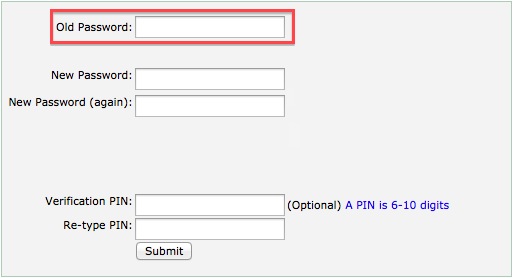
- Enter your current password in the Old Password text box.
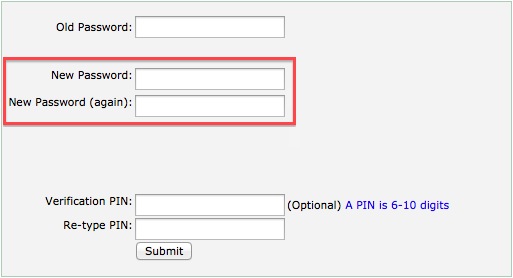
- Enter your new password in the New Password text box. Click Here for information about creating strong passwords.
- Enter your new password in the New Password (again) text box.
- Click the Change password button. This will take you to a completion page.
- Click the RELOGIN option. This will take you to a sign in page.

If you have forgotten the password
If you have forgotten your password we can send you a link to the email address, on file, to reset your password.
Requesting the link:
- Go to Justhost.com
- Click the Control Panel Login button.
- Click the "Forgotten Password" link
- Enter your Domain Name or Username
- Click "Lookup Account"
- Open the email sent from support@justhost.com
- Click the reset password link
- Enter your new password in the New Password text box. Click Here for information about creating strong passwords.
- Enter your new password in the New Password (again) text box.
- Click the Change password button. This will take you to a completion page.
- Click the RELOGIN option. This will take you to a sign in page.
Knowledgebase Article
 88,703 views
 bookmark
 share
share
 tags: change cpanel password passwords protect
(updated 296 days ago)
tags: change cpanel password passwords protect
(updated 296 days ago)
88,703 views
bookmark
share
 E-mail
 Twitter
 Google Bookmarks
 Facebook
 MySpace
 Digg
Digg Reddit
 Delicious
 LinkedIn
 StumbleUpontags: change cpanel password passwords protect
(updated 296 days ago)
StumbleUpontags: change cpanel password passwords protect
(updated 296 days ago)
Recommended Help Content
This tutorial will show you how you can password protect parts of your website by password protecting the folder(s) on your account. (updated 383 days ago)
This article will explain how to log in to your Account Control Panel (updated 223 days ago)
How do I Access My Account Control Panel? (updated 495 days ago)
Related Help Content
If you are receiving an error that the page could not be displayed when trying to log into the control panel. It is most likely due to the fact that your firewall is blocking the port that the control (updated 664 days ago)
How do I Password Protect a single file on my website? (updated 390 days ago)
How do I password protect a folder on my website? (updated 1411 days ago)
How does a person change the Password, create an Autoresponder and setup Email Filtering on their individual email account without logging into the main account control panel? (updated 398 days ago)
Knowledgebase Article
74,576 views
tags: aging auto autoresponder filter filtering password responder
74,576 views
tags: aging auto autoresponder filter filtering password responder
How to change the password for a Resold account. (updated 197 days ago)
Explanation of cPanel's Features. (updated 1397 days ago)
How Do I Password-Protect a Folder in FrontPage? (updated 1421 days ago)