
Just Host Web Hosting Help
Installing Application using MOJO Marketplace
Summary
MOJO Marketplace provides easy one-click management of the web's top applications, this article will show you how to install an application using the MOJO Marketplace.- Accessing the MOJO Marketplace Installer
- Choose the Application
- Installation Preferences
- Advanced Options
- Legal Information
- Logging into the newly installed Application
Accessing the MOJO Marketplace Installer
- Login to your Just Host cPanel.
- Locate the MOJO Marketplace section.
- Click the One-Click Installs icon.

Choose the Application
- Select the application you would like to install.
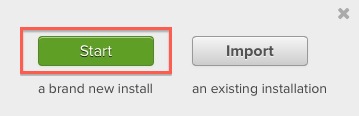
- Click Start a brand new installation.
Installation Preferences
- From the drop-down menu choose the Domain Name you would like to use for this application.
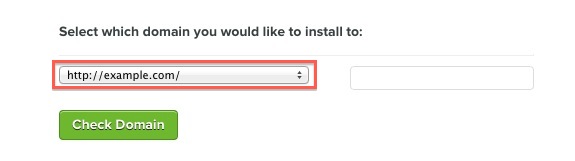
Anything entered in the field following the domain name will be a part of the URL.
- Click on Check Domain.
Advanced Options
Here you may specify options such as the site name, login details, the database to use or other options. This will differ depending what you are installing. The following is an example of what you may see.
- Site Name: This will be the name displayed on your site. This is not the URL, but simply the name used on your site.
- Admin Username: The desired login name for your application
- Admin Password: The desired password for this application
Click Here for information about creating strong passwords.
Automatically create a new database
If using this option, the MOJO Marketplace installer will automatically create the database and database username for you. If you choose to use your own database you will need to create it first.
- Hostname: The name of the host where the database is located. If the database is on your Just Host account then it would be "localhost "
- Username: The database username.
- Password: The password for the database username.
- Database Name: The name of the database
Legal Information
Be sure to read the Terms and Conditions regarding the application that you will be installing. Once you have read through the terms and conditions check the box "I have read the terms and conditions of the GPLv2".
Logging into the newly installed Application
The MOJO Marketplace installer will take a couple of minutes to install your application. Once done you will be presented with the Login Username, Password, Site URL and the Admin URL. This information will be emailed to you as well.
 116,259 views
 bookmark
 share
share
 E-mail
 Twitter
 Google Bookmarks
 Facebook
 MySpace
 Digg
Digg Reddit
 Delicious
 LinkedIn
 StumbleUpon
 tags: install program programs script simple
(updated 42 days ago)
tags: install program programs script simple
(updated 42 days ago)
Recommended Help Content
Related Help Content
43,663 views
tags: process quits responding seconds stop stopped stops terminated terminates throttle timing