How can I use my website with the Free SSL Certificate?
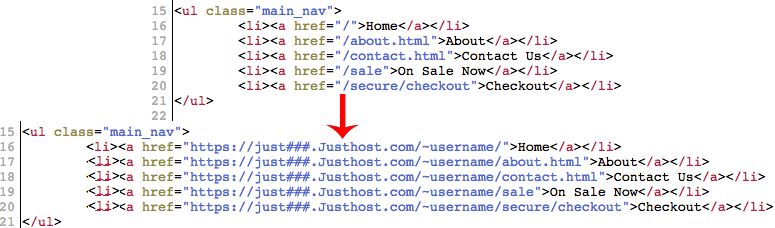
To use the shared SSL Certificate, update the hyperlinks that need to be secure to use the base URL of:
https://just###.Justhost.com/~username
In the above example replace just### with the server for your account. If you do not have your server box number, go to Files and select File Manager. The box number will be the first part of in the address bar.
Also replace "username" with your 8-character cPanel username. This also is listed on the left side of your Just Host cPanel.Changing hyperlinks.
Please note the Shared SSL Certificate does have data limitations; in order to prevent abuse by others using the free secure.Justhost.com SSL proxy, any embedded data (images, audio clips, etc) larger than 100kb will be truncated; this is a per-file limit, not a total page size limitation. This can cause elements on your websites to only load half-way, especially on those websites using larger images.
If you experience problems with your site only partially loading when using the Shared SSL Certificate through the secure.Justhost.com, try the following:
Reduce the number of images on your website.
Resize the images on your website.
Convert the images into a type that has better compression, such as .png and .gif.
Verify your elements are not reaching the 100kb limit.
Note: If none of these suggestions resolve your problem, you'll likely need to upgrade your hosting account with a private SSL certificate and a Dedicated IP address; please see our article regarding that here.

 414,934 views
 bookmark
 share
share
 E-mail
 Twitter
 Google Bookmarks
 Facebook
 MySpace
 Digg
Digg Reddit
 Delicious
 LinkedIn
 StumbleUpon
 tags:
tags: