
Just Host Web Hosting Help
How to Access the System Console
There are various reasons to access the system console. You can manage your server from the command line here. .
If you have not set your root password, please see: Setting your Root Password
- To begin, log into your Control Panel.
- Once logged in, you'll want to go to the server tab

- On the Server tab choose the System Console tab.
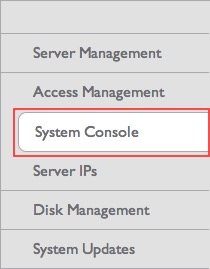
- Click the View console only button.
This will open your system console (a large black window) and should say server login, if not press enter and it will appear.
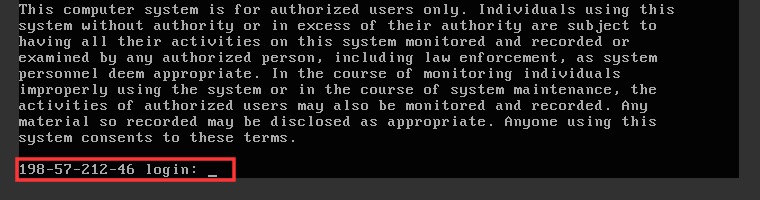
- Now you'll want to log in as the root user.
server login: rootpassword: your root passwordPlease note that you will not be able to see your password.
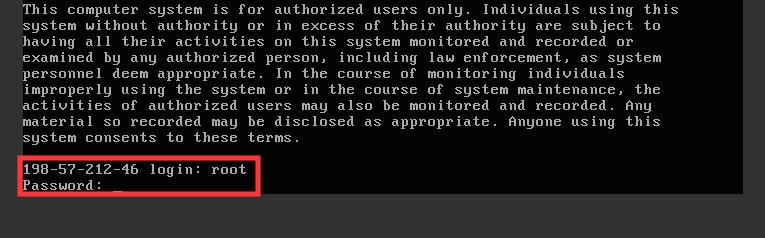
- Press the Enter/Return key to enter the password.
That's it. You are now logged into your server as the root user.
 bookmark
 share
share
 E-mail
 Twitter
 Google Bookmarks
 Facebook
 MySpace
 Digg
Digg Reddit
 Delicious
 LinkedIn
 StumbleUpon
Recommended Help Content
This article will explain how to configure your dedicated or VPS server to use the new (non legacy) backup system.
How to quickly grant sudo access from the control panel
Explanation of the cause of the warning and how to remove it.
Related Help Content
How to edit PHP Configuration --- VPS or Dedicated
This article will explain how to view the email logs on a Dedicated or VPS server. This may be usefull if you are experiencing trouble with your email.
VPS and Dedicated customers with servers running the CentOS 6 operating system will not be able to upgrade cPanel past version 86. The cPanel team will still support CentOS 6 with cPanel 86 until March 31st, 2021.
Knowledgebase Article
 5,808 views
 tags: centos cpanel dedicated hosting private server upgrade virtual vps
5,808 views
tags: centos cpanel dedicated hosting private server upgrade virtual vps
How to protect your Dedicated Server using cPHulk
How to assign a dedicated IP to a domain on a dedicated server.
This article explains the proper procedure for requesting an OS Reload.
How to fix inaccessible backups on Dedicated or VPS servers due to backup size.