
Just Host Web Hosting Help
Download a full cPanel backup using the Site Backup & Restore tool
Problem:
How do I download a full backup of my Just Host account?
Solution:
To backup your files and folders you can use the Site Backup Pro tool, located in the File Management category within your cPanel.
- Login to your Just Host account.
- Click the Site Backup Pro tool.

- Click "Full cPanel Backup".

- Choose the date of the backup you wish to use.
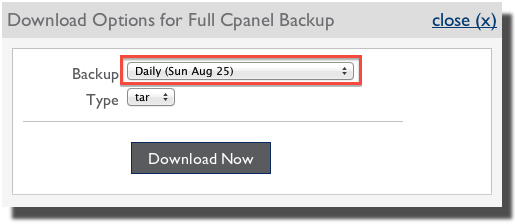
- Choose if you will use "TAR (.tar)" or "ZIP (.zip)" archive.
Knowledgebase Article
 66,659 views
 bookmark
 share
share
 tags: backup cpanel email restore site
(updated 360 days ago)
tags: backup cpanel email restore site
(updated 360 days ago)
66,659 views
bookmark
share
 E-mail
 Twitter
 Google Bookmarks
 Facebook
 MySpace
 Digg
Digg Reddit
 Delicious
 LinkedIn
 StumbleUpontags: backup cpanel email restore site
(updated 360 days ago)
StumbleUpontags: backup cpanel email restore site
(updated 360 days ago)
Recommended Help Content
How to restore Email Messages the Site Backup Pro tool (updated 359 days ago)
How to restore individual files or folders with the Site Backup & Restore tool (updated 1108 days ago)
How to backup all of your MySQL databases using the Site Backup & Restore tool (updated 1108 days ago)
Related Help Content
How to restore MySQL databases using the Site Backup & Restore tool (updated 974 days ago)
How to restore MySQL databases using the Site Backup & Restore tool (updated 747 days ago)
How to backup individual files or folders with the Site Backup Pro tool (updated 350 days ago)
Site Backup & Restore tool displays unexpected dates. (updated 1167 days ago)
Index for all Site Backup and Restore how-to articles (updated 360 days ago)
How do I restore my old hosting provider backup onto Just Host? (updated 1775 days ago)
We provide several programs to be able to check your email online. cPanel Mail section where Email Accounts icon is located Navigate to the Mail section inside cPanel. Click the Email Accounts icon. (updated 407 days ago)
How often do you backup my site? When do automated backups take place? (updated 657 days ago)