In case you want to manage catalog price rules you should:
- Enter the Magento admin panel
- Select the “Promotions” tab
- Select “Catalog Price Rules”
- Use the “Add New Rule” button to create a new price rule. Set rule details:
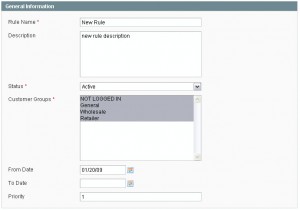
– the rule name
– enter the rule description
– set the rule to be active or not
– select the customer groups that the rule would be applied to
– set your rule time period - 5. Now, we can proceed to the “Conditions” page
For example, let’s create settings for such a situation: customers will get a 20% discount when they order goods which price is greater than $100.
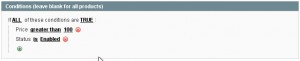
1. In the “Actions” tab we can set the discount

2. When you are done, click the “Save Rule” button.
Alternatively, click the “Save and Apply” button in case you want to start using the rule right away.