
Just Host Web Hosting Help
VPS or Dedicated Hosting - Reseller Account Transfers
There are different ways that the WHM helps to transfer accounts to the dedicated server, as easily as possible. Here are the steps for the two most common ways.
Single Account Transfer
To help transfer a single account's content to the dedicated server follow these steps:
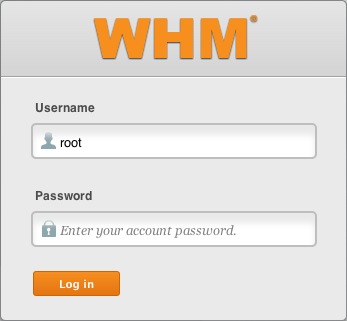
- Log in to the WHM.
- Click on Transfers.
- Click on Copy an Account From Another Server with an Account Password. (Does not require root access)
- Then fillout the following fields:
- Click on Copy Account.
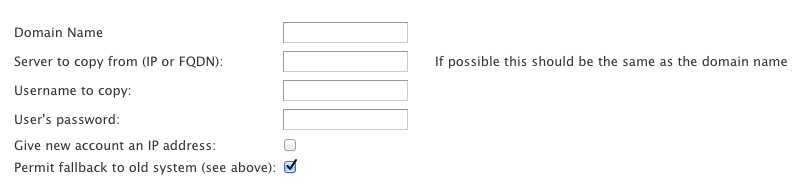
Note: if you want to assign the account a dedicated IP then you would check the box next to Give new account an IP address.

Transferring Multiple/single Accounts with Root Access
If you have root access and you need to copy multiple accounts and packages from another server, follow this,
- Log in to WHM.
- Go to the Transfer section.
- Click Copy Multiple Accounts/Packages From Another Server. (Requires root access, the other one doesn't)
- Enter the Remote Server Information.
- Remote Server Type – The web control panel that the remote server is running, usually WHM.
- Remote Server Address – The hostname of the source server that the customer is migrating data from. This can be an IP address or something that resolves to the IP address of their other server.
- Remote SSH port – The remote SSH port you wish to use. By default, SSH runs on port 22.
- Check SSH Connection – Check to test your ability to connect to the remote server.
- Do Not Compress Transfers – Check to leave the transfer uncompressed. Compressing a transfer will use slightly more CPU from the source server, the transmitted data will be smaller and the transmitting time will be faster.
- Use SSL – Check to encrypt the transmitted data.
- Use Incremental Backups speed-up – Check to decrease the amount of time it takes to package the account on the source server. If a daily incremental backup is available, WHM will use that backup as a starting point. The system will then update the package before it is transferred.
- Allow Override – Check to override the usual transfer process in favor of a customized script. The custom script must reside in /var/cpanel/lib/Whostmgr/Pkgacct on the server to which the account will be copied (local machine)
- Enter the Authentication information.
- Login – Select the login method. If you select Root, you will need to enter the root password in the Root Password field below. If you select User, you will need to enter the remote account's username and password.
- Authentication Method – Select the connection method. If you will select Password, and you are a Root user, you will also need to select a Root Escalation Method. If you select Public Key, you may need to enter a SSH Key Password.
- Root Escalation Method – For User login only.
- Root Password – The root password for the account.
- Use FTP to Transfer – To use FTP as the alternative for transfer.
- Click Fetch Account list to display a list of accounts to copy.
- Select an account or accounts to copy. Select packages used by the account you're going to migrate.
- Click Copy.

Knowledgebase Article
 1,544 views
 bookmark
 share
share
 tags: account dedicated multi multiple reseller single transfer whm
(updated 63 days ago)
tags: account dedicated multi multiple reseller single transfer whm
(updated 63 days ago)
1,544 views
bookmark
share
 E-mail
 Twitter
 Google Bookmarks
 Facebook
 MySpace
 Digg
Digg Reddit
 Delicious
 LinkedIn
 StumbleUpontags: account dedicated multi multiple reseller single transfer whm
(updated 63 days ago)
StumbleUpontags: account dedicated multi multiple reseller single transfer whm
(updated 63 days ago)
Recommended Help Content
How to setup name servers for multiple cPanel accounts. (updated 63 days ago)
Knowledgebase Article
1,585 views
tags: accounts custom dedicated multi multiple nameservers server servers
1,585 views
tags: accounts custom dedicated multi multiple nameservers server servers
How to specify the default Name Servers on a reseller account (updated 251 days ago)
How to assign a dedicated IP to a domain on a dedicated server. (updated 63 days ago)
Related Help Content
Using WHM to add a resold account to your reseller account. (updated 238 days ago)
Transfer Domain Registration: When a domain registration is transferred to us, we must register the domain name for a minimum of one (1) year. We only accept registrations for the .com, .net, .org, . (updated 115 days ago)
To help with installing an SSL certificate for an account on a dedicated server through the WHM (updated 63 days ago)
How to create a package on your Reseller account. (updated 44 days ago)
How to assign a dedicated IP addresses for a Reseller's Customer Account. (updated 251 days ago)
How to transfer a domain name that is registered with us to another registrar. (updated 339 days ago)
How to use use the FTP Account tool to create additional FTP Accounts. This is useful for granting FTP access to your account without giving anyone your cPanel password. (updated 456 days ago)
Video "How-to" Tutorial
282,888 views
tags: account accounts cpanelutilities ftp login publish upload
282,888 views
tags: account accounts cpanelutilities ftp login publish upload
How do I transfer my domain's registration to Just Host? Is it required to transfer my domain's registration to Just Host? (updated 86 days ago)