
Just Host Web Hosting Help
Email Forwarders
Summary
Forwarders allow you to forward e-mail to a different e-mail address, or more then one person
Email Account Forwarders
To create an email forwarder please do the following:
- Login to your Just Host Control Panel
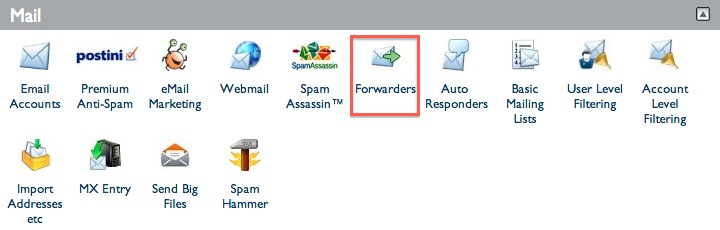
- Click Forwarders located in the Mail section
- Under the Email Account Forwarders section, Click Add Forwarder
- Type in the Address to Forward
- Forward to email address
- Click Add Forwarder
To add additional forwarders, simply repeat steps 3-5, choosing the same email address as the recipient, like so:
support@domain.com --> email@domain1.com (click the Add button)
support@domain.com --> email@domain2.com (click the Add button)
support@domain.com --> email@domain3.com (click the Add button)
Email Domain Forwarders
Domain Forwarders will forward all emails from one domain name to another.
Note: Emails will be forwarded to email addresses with matching usernames, meaning that emails sent to joe@example.com would be forwarded to joe@newdomains.com.
- Login to your Just Host Control Panel
- Click Forwarders located in the Mail section
- Under the Email Domain Forwarders section, Click Add Domain Forwarder
- Type in the Address to Forward
- Forward to email address
- Click Add Forwarder
 100,474 views
 bookmark
 share
share
 E-mail
 Twitter
 Google Bookmarks
 Facebook
 MySpace
 Digg
Digg Reddit
 Delicious
 LinkedIn
 StumbleUpon
 tags:
tags: Recommended Help Content
I have purchased Postini for an email account however email sent to the forwarders is not being filtered. (updated 391 days ago)
I am not receiving messages sent through my e-mail forwarders. (updated 294 days ago)
How to use the Forwarders tool to automatically forward your email or to setup an alias. (updated 310 days ago)
Related Help Content
Learn how to create an email account associated with your domain name (updated 86 days ago)
Can I setup an email account for Addon or Parked domains? (updated 401 days ago)
Account level Filters. (updated 385 days ago)
How to setup an email account on an Android based device. (updated 736 days ago)
Can I make subdomains for my addon domains on the account? (updated 398 days ago)
Email is not being received when forwarded to free email services such as Gmail, Yahoo, or Hotmail and other ISP's that provide email service such as AOL, Comcast, Cox, etc. It can show completed in t (updated 390 days ago)
All of my email folders are missing. How can I get them to show up? (updated 988 days ago)
How to restore Email Messages the Site Backup & Restore tool (updated 745 days ago)