
Just Host Web Hosting Help
Create a New Email Account
Summary
To setup an email address for your domain name is easily accomplished within your justhost Control Panel.
Create a new Email Address
- Login to your Control Panel.
- Click the Email icon.
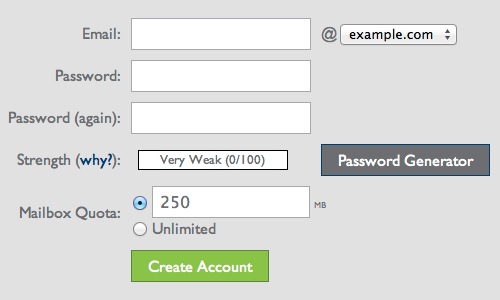
- Enter the email address you desire.
- Enter a secure password and type it again.
- Click the Create Account button.

Your email address has been setup. You may close the confirmation message and begin using your email address.

 bookmark
 share
share
 E-mail
 Twitter
 Google Bookmarks
 Facebook
 MySpace
 Digg
Digg Reddit
 Delicious
 LinkedIn
 StumbleUpon
Recommended Help Content
We provide several programs to be able to check your email online. cPanel Mail section where Email Accounts icon is located Navigate to the Mail section inside cPanel. Click the Email Accounts icon. (updated 18 days ago)
This article will explain how to log in to your Account Control Panel (updated 199 days ago)
How do I Access My Account Control Panel? (updated 470 days ago)
Related Help Content
. Select the 'Read Mail Using Horde' icon. Click the 'Log in' button. Select the 'Mail' icon. Now, you can read the emails you've received. Click on the sender or subject of the email. There are sever (updated 585 days ago)
Learn how to create an email account associated with your domain name (updated 60 days ago)
If you are receiving an error that the page could not be displayed when trying to log into the control panel. It is most likely due to the fact that your firewall is blocking the port that the control (updated 639 days ago)
How do I log into cPanel securely? (updated 1395 days ago)
How to Configure Eudora Pro to Access Email? (updated 1370 days ago)
I am having problems with being spammed. I believe that my email address has been harvested (taken off my site and sold to spammers). Can I hide my email address, but still have people email me? (updated 373 days ago)
How does a person change the Password, create an Autoresponder and setup Email Filtering on their individual email account without logging into the main account control panel? (updated 373 days ago)
Knowledgebase Article
 73,478 views
 tags: aging auto autoresponder filter filtering password responder
73,478 views
tags: aging auto autoresponder filter filtering password responder
You can use autoresponders to send a message back automatically to anyone who sends an email to a certain account. This can be useful for times when you are on vacation or unavailable, or if you have a generic message that you wish to send for a support email address. (updated 172 days ago)