
Just Host Web Hosting Help
PHP Memory Limits
Summary
This article will explain how to modify the total amount of RAM that can be used by your PHP applications.
Generating a new php.ini file
- Login to your Just Host cPanel account
- Click on the PHP Config icon located under "Software/Services"

- Click the Save Changes button
Using the File Manager
- Locate the Files section
- Click the File Manager icon.

- If prompted choose "Web Root", otherwise navigate to the public_html folder.
- Right click the php.ini file
- Choose either Edit or Code Edit
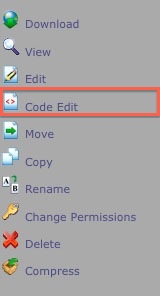
- Click the Edit button.
- Search for "memory_limit", without the quotes.
- Enter the new memory limit for your php applications.
- Click "Save Changes"
You can press Control + F on your Windows PC or Command + F on your Mac to use your browsers search function.
It is not recommend to increase this limit past 128 MB.
Using an FTP Client
- Connect to the server with your FTP client.
FTP - Uploading the website
- Navigate to the public_html folder.
- Download the php.ini file.
- Open the file with any text editor.
- Search for "memory_limit", without the quotes.
- Enter the new memory limit for your php applications.
- Save the file.
- Upload the file using your FTP client.
It is not recommend to increase this limit past 128 MB.
 33,179 views
 bookmark
 share
share
 E-mail
 Twitter
 Google Bookmarks
 Facebook
 MySpace
 Digg
Digg Reddit
 Delicious
 LinkedIn
 StumbleUpon
 tags:
tags: Recommended Help Content
Available PHP Memory Exhausted. (updated 765 days ago)
How to install the php.ini file and then increase the PHP Memory limit. (updated 500 days ago)
Wordpress Error: Unable to create directory /wp-content/uploads/2009/mydir/summer/ Is its parent directory writable by the server? (updated 1382 days ago)
Related Help Content
When creating a symlink to a php page, I get a 500 error. I am able to use symlinks to other files and folders fine. (updated 1171 days ago)
How do I enable PHP 5 for my PHP applications? How do I change to PHP FastCGI? How do I use a single php.ini file? (updated 36 days ago)
If you have a WordPress blog hosted on wordpress.com, you can easily export it and import it to WordPress that is installed on your hosting account with justhost. Login to the WordPress D (updated 652 days ago)
How to customize your html or php error pages. (updated 291 days ago)
I get this with some of my php files: Fatal error: Unable to read X bytes in /home/user/public_html/myfile.php on line Y (updated 1417 days ago)
How do I change the PHP environment for my site with php.ini? (updated 17 days ago)
I'm trying to configure an application (phpList) and it requires that I enter (in config.php) a username and password for a POP3 account to handle bounces. I keep getting a POP3 error and it can't log (updated 1429 days ago)
Have FrontPage extensions and Wordpress installed on account. Was working fine in the past, but now cannot connect with FrontPage and Wordpress does not link properly. (updated 461 days ago)