
Just Host Web Hosting Help
VPS or Dedicated Hosting - Resetting the SSL certificates for your server's services
Resetting the Certificates for your Server's Services
- Login to WHM. To see how to login to WHM, please see: VPS or Dedicated - How to login in to WHM
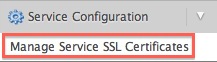
- In the search field, located in the upper left hand side of the page, enter Manage Service SSL Certificates
- Choose the Manage Service SSL Certificates tool.
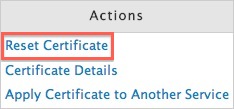
- To the right of the expiring certificate, click Reset Certificate
- Click the Proceed button, in the confirmation window.
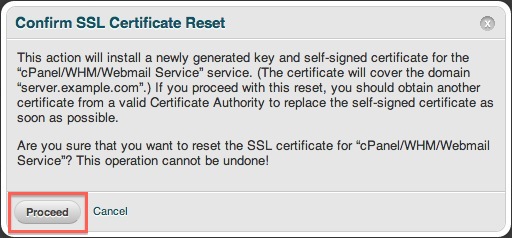
WHM will now install a newly generated Self Signed SSL Certificate for the select service.
 bookmark
 share
share
 E-mail
 Twitter
 Google Bookmarks
 Facebook
 MySpace
 Digg
Digg Reddit
 Delicious
 LinkedIn
 StumbleUpon
Recommended Help Content
How to manage the SSL used for cPanel login through the WHM
To help with installing an SSL certificate for an account on a dedicated server through the WHM
If you need to transfer or restore a cPanel account for your VPS or Dedicated server, there is a tool within the WHM panel to perform these tasks. This article is about transferring or restoring from another server or restoring after a re-image.
Knowledgebase Article
 10,659 views
 tags: backup cpanel dedicated hosting restore server transfer vps
10,659 views
tags: backup cpanel dedicated hosting restore server transfer vps
Related Help Content
VPS and Dedicated servers come with all applications necessary to run a standard web and email server. The applications that come with the VPS and Dedicated servers are generally supported as-is by our support technicians.
Knowledgebase Article
10,259 views
tags: application configserver csf dedicated django elastisearch ffmpeg java js litespeed mongodb nginx node private python server tomcat virtual vps
10,259 views
tags: application configserver csf dedicated django elastisearch ffmpeg java js litespeed mongodb nginx node private python server tomcat virtual vps
How to setup name servers for multiple cPanel accounts.
Knowledgebase Article
164,682 views
tags: accounts custom dedicated multi multiple nameservers server servers
164,682 views
tags: accounts custom dedicated multi multiple nameservers server servers
This article will explain how to restart the email related services on a Dedicated or VPS server. This may be useful if you are experiencing trouble with your email.
VPS and Dedicated customers with servers running the CentOS 6 operating system will not be able to upgrade cPanel past version 86. The cPanel team will still support CentOS 6 with cPanel 86 until March 31st, 2021.
Knowledgebase Article
12,199 views
tags: centos cpanel dedicated hosting private server upgrade virtual vps
12,199 views
tags: centos cpanel dedicated hosting private server upgrade virtual vps
How to add a new SSL certificate for your different WM services.
This article will explain some common causes for 500 errors on Dedicated or V.P.S servers.
This article will explain how to disable SSLv3 on a VPS or Dedicated server. This can help you avoid issues with vulnerabilities in SSLv3.