Understanding Statistical Significance with Omniture Test&Target;
What's Happening
Featured
BY Jason Thompson
KEYSTONE SOLUTIONS
The following example illustrates how key statistical measures are calculated using formulas documented by Omniture (adobe) Consulting Services:
NOTE: If you want to run “what if” analysis to determine what type of volume and conversion rates you need to see in order to reach an optimal level of statistical significance, use the Keystone Solutions Optimization Test Confidence Calculator.
For our campaign, lets assume the following facts:
- Our campaign has two treatments, a control and one alternative.
- The control has had 4,008 visitors
- The alternative has had 4,003 visitors
- The control has had 377 conversions
- The alternative has had 355 conversions
#1 – Conversion Rate

Conversion rate equals the number of conversions divided by the number of starts, in this example we are using visitors but this can be visits, impressions, unique starts, etc. depending on how you measure site conversion.

Conversion Rate (control) = 377 / 4,008 = 9.41%
Conversion Rate (alternative) = 355 / 4003 = 8.87%
#2 – Standard Deviation
Standard Deviation shows how much variation (measures the spread or dispersion of a set of data) there is from the “average” (mean). As conversion rate is a binomial distribution, either a visitor converts or does not convert, the binomial distribution for variance is used:

Variance (control) = .0941(1 – .0941) = 0.09
Variance (alternative) .0887(1 – .0887) = 0.08
To calculate Standard Deviation from the variance, we take the square root of the variance:

Standard Deviation (control) = SQRT(0.09) = 0.29
Standard Deviation (alternative) = SQRT(0.08) = 0.28
#3 – Standard Error
The Standard Error is the estimated Standard Deviation of the error; the “noise” in the result. The Standard Error is calculated in order to calculate to Signal-to-Noise ratio.
To calculate the Standard Error for the Control:
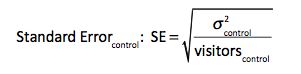
Standard Error (control) = SQRT(0.09 / 4008) = 0.005
To calculate the Standard Error for the alternative:
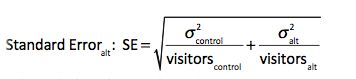
Standard Error (alternative) = SQRT((0.09 / 4008) + (0.08 / 4003)) = 0.006
# 4 – Signal-to-Noise Ratio
To calculate the Signal-to-Noise ratio:
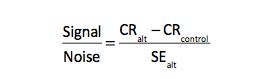
Signal-to-Noise = (9.41 – 8.87) / 0.006 = 0.84
OK….stay with me…..we are almost there.
#5 Finally We Arrive At Confidence
We will make use of the Signal-to-Noise ratio to calculate confidence using the Student’s T-Test.

Student’s T-Test = 1 – TDIST(ABS(0.84),(4003 + 4008 -2),2) = 0.60

As reported by Test & Target, we are 60% confident in the current results.
Extra Credit: Confidence Intervals

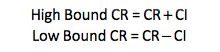
The Confidence Interval shows how much your test results can vary and still be within a predetermined confidence level. Standard confidence levels are 90%, 95%, 99%, and 99.5%. Omniture Test & Target uses the 95% confidence level.
To calculate the Confidence Interval:
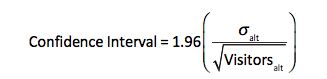
Confidence Interval = 1.96(0.28 / SQRT(4003)) = 0.008
1.96 is a constant in this formula. 1.96 is equal to z*, which is taken from a Standard Normal Critical Values table based on 95% Confidence Level. The Standard Normal Critical Values Table can be found in any introductory level statistics book.