Enterprise API Overview
Introduction
The Enterprise API provides Customers with programmatic access to collect, import, export and run reports on their data. The following diagram shows the relationships between the various parts of the Enterprise API:
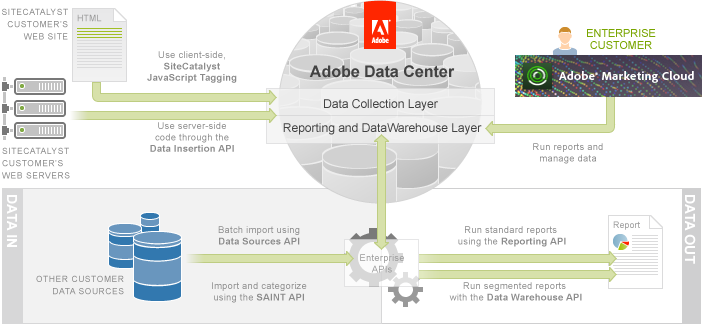
Using the Enterprise API, you can add data to the Adobe Marketing Cloud (Data In) and run reports on this data (Data Out).
Data In
- SiteCatalyst Tagging - Client-side Javascript tagging is the primary way that your website collects visitor data using SiteCatalyst. This tutorial is not an exhaustive explanation of tagging, but rather a quick overview that will give you enough experience to build test pages. Whether you plan to work with the Enterprise API or the Partner API, this tutorial will walk you through the steps of collecting data from your site.
- Data Insertion API Tutorial - Most web sites use client-side JavaScript tagging to submit data to SiteCatalyst. In this article you learn an alternate way to collect data using server-side data submission via the Data Insertion API.
- Data Sources API Tutorial - Visitor interaction with your web site is not the only way to collect data in the Adobe Marketing Cloud. In this article, you learn how to upload batches of data directly from external resources using the Data Sources API.
- SAINT API Tutorial - Sometimes you need additional data to enhance the readability and usefulness of a report. In this article, learn how to use the SAINT API to import data and associate it with existing report data.
Data Out
- Reporting API Tutorial - There are both visual and programmatic ways to create reports in SiteCatalyst. In this article, you learn how to use the SiteCatalyst UI and the Reporting API to create reports. You also learn about the Report Builder and Web Services Explorer tools.
- Data Warehouse API Tutorial - There are thousands of standard SiteCatalyst reports, but they cannot always provide you answers to your more complex questions. In this article, you learn about Data Warehouse and how to create segment definitions to generate advanced reports.