Author: Template-help.com Team
The Joomla Project is pleased to announce the immediate availability of Joomla 1.7.0. This is a security release. This is also the first release made within the new six-month release cycle that started with the delivery of Joomla 1.6 in …
Read More...
Author: Template-help.com Team
Rename “index.html” file to “index.php” on the server and in the Tab URL settings.
Read More...
Author: Template-help.com Team
How to create a new APP?
Read More...
Author: Template-help.com Team
Apps on Facebook.com are loaded into a Canvas Page. A Canvas Page is quite literally a blank canvas within Facebook on which to run your app. You populate the Canvas Page by providing a Canvas URL that contains the HTML, …
Read More...
Author: Template-help.com Team
1. Go to the Application Profile Page (linked to from right hand col on your app’s main page (where it shows stats, your app id, site url etc) 2. From Application Profile Page click on “Edit Application” – left hand …
Read More...
Author: Template-help.com Team
Quotation from Facebook developers blog: Starting this week, we are requiring every developer to verify his or her Facebook account to create new applications. This is the same quick process that users go through when they want to do things …
Read More...
Author: Template-help.com Team
Please, contact our technical support department. You may contact them via live chat : http://chat.template-help.com/ Or you may submit a trouble-ticket via : http://esupport.template-help.com/ to get a prompt reply. Please, do not forget to provide our technical support representatives with …
Read More...
Author: Template-help.com Team
Please, contact our billing department via billing@template-help.com or via live chat : http://chat.template-help.com/ Please, do not forget to provide our billing representatives with your order number, your e-mail address which you used for your purchase, your name and your template …
Read More...
Author: Template-help.com Team
Please, submit your request to yan@template-help.com. You should provide us with details for the new invoice. Usually such requests are handled within 24-48 hours.
Read More...
Author: Template-help.com Team
Please contact us at billing@template-help.com with the screenshot of the credit card statement showing extra charges and we will reply you within 1 business day with all the details
Read More...
Author: Template-help.com Team
Please contact our billing representative via live chat at template-help.com/chat/ or via e-mail billing@template-help.com with your order .
Read More...
Author: Template-help.com Team
Although the credit card was accepted by the merchant system we keep the right for our own anti-fraud verification. It is clearly stated in our Terms and Conditions. In all cases of fraudulent activity online it is always the vendor …
Read More...
Author: Template-help.com Team
In order to assist you in resolving this problem we kindly ask you: -please, provide your full name as it is on the credit card, exact sum as it is on statement and exact date of the transaction; -your credit …
Read More...
Author: Template-help.com Team
Please contact them directly and ask them to unblock this transaction from their end. If you do not wish to unblock your card for international transactions you may pay with AMEX via Paypal merchant system with the card directly without …
Read More...
Author: Template-help.com Team
You can pay via Webmoney either by choosing Webmoney option or Robox option on our checkout page.
Read More...
Author: Template-help.com Team
Since Moneybookers merchant system supports different types of payments there may be several reasons for this: If you paid via bank transfer it may take several business days for the order to go through. We will send you the product …
Read More...
Author: Template-help.com Team
It may take some time from Googlecheckout to process your card. Usually it takes from several minutes up to 6 hours, it depends on GoogleCheckout and we can’t speed up this process. They may also decline your card and send …
Read More...
Author: Template-help.com Team
This might happen if you initiated the eCheck transaction via paypal. In this case it will take several business days for the order to go through. The ETA for clearing can be checked in your paypal account.
Read More...
Author: Template-help.com Team
You can purchase the template with the card without creating the account with PayPal. To do this please choose PayPal option on the checkout page and press *Don’t have PayPal account?* on the next page. Than follow the instructions on-line.
Read More...
Author: Template-help.com Team
If you still want to place your order via PayPal , you need to know which payment methods are available when sending money : When you pay , the first thing PayPal will do is check your PayPal balance to …
Read More...
Author: Template-help.com Team
The most common reasons why the payment is not processed: a) credit card details entered incorrectly: name precisely as it is on the card or account, billing address associated with the account, card number, CVV/CVC code, expiration date must match …
Read More...
Author: Template-help.com Team
As our company delivers non-tangible products and we take all risks in case of the chargeback, we should verify each order manually. It helps us to protect our customers and us from fraudulent transactions. This verification is one time only.
Read More...
Author: Template-help.com Team
It depends on the payment method you choose. If you order the template with credit or debit card or instant payment via PayPal or Moneybookers option than it will take up to 10-15 minutes to get the template. If you …
Read More...
Author: Template-help.com Team
Once the order is completed you receive an e-mail with download instructions. Each product is downloaded via a unique download link. We do not ship our products on CD/DVD or other digital carrier.
Read More...
Author: Template-help.com Team
Just put it into the billing address field on our checkout page. Please mind if you pay via RBS Worldpay merchant system you need to put in PO in the field *Street Name* and the number of the box in …
Read More...
Author: Template-help.com Team
You can learn about our affiliate program by visiting this page: http://www.templatemonster.com/register_aff.php and if you will have any further questions please feel free to contact our affiliate department directly at support@mytemplatestorage.com
Read More...
Author: Template-help.com Team
Please mind that you may enter a discount code on the shopping cart page in the appropriate field at the bottom of the page.
Read More...
Author: Template-help.com Team
If you want to include any specific information into your invoice (such as company name, VAT number etc), please send your request via e-mail to yan@template-help or billing@template-help.com. You will be assisted within 1-2 business days.
Read More...
Author: Template-help.com Team
You can download an invoice by following the appropriate link in the e-mail with your download instructions. We use information submitted by you on the checkout page to generate an invoice.
Read More...
Author: Template-help.com Team
We accept all major credit and debit card types. You will be able to choose the type of your card during the checkout process on-line. Make sure that your card is allowed for Internet transactions.
Read More...
Author: Template-help.com Team
You can purchase our products with your credit/debit card using one of our merchant systems: RBS Wordlpay, Paypal, Googlecheckout etc. Our payment gateways accept: Visa, MasterCard, Discover, American Express, Dinners, JCB. We recommend using RBS Worldpay to pay with your …
Read More...
Author: Template-help.com Team
Our company does not charge extra fees if you pay via bank transfer. It may be possible that your bank inflicts additional fees.
Read More...
Author: Template-help.com Team
Please mind that the payment for your template is a one-time charge. No additional fees apply.
Read More...
Author: Template-help.com Team
It depends on the chosen merchant system. Usually, an ETA for your payment can be reflected in your transaction receipt from the merchant system. Please, mind that a bank transfer is not an instant payment option and be ready to …
Read More...
Author: Template-help.com Team
You can pay for the template by means of a bank transfer (including your domestic payment options) via RBS WorldPay or Moneybookers merchant system. Please choose one of these payment options during the checkout process and follow the instructions. Please …
Read More...
Author: Template-help.com Team
Drupal templates starting from #30278 are compatible Drupal 6.19 Drupal 6.19 release anouncement is available here. You can also check the release notes to see the updates
Read More...
Author: Template-help.com Team
Magento templates starting from 32147 are fully compatible with Magento 1.4.2.0
Read More...
Author: Template-help.com Team
ZenCart templates starting from template #32377 are provided with updated sample sub-pages
Read More...
Author: Template-help.com Team
You can find the Prestashop 1.3.6.0 copatible templates starting from template #32522
Read More...
Author: Template-help.com Team
You can find Prestashop 1.3.4.0 starting from template #32444
Read More...
Author: Template-help.com Team
osCommerce templates starting from #32533 are provided with new sample sub-pages.
Read More...
Author: Template-help.com Team
Drupal templates starting from #32668 are compatible with Drupal 7 Drupal 7 features: Vastly improved administrative user interface thanks to the D7UX movement Flexible content and custom fields Better visual presentation and theming with Render API Accessibility is greatly improved …
Read More...
Author: Template-help.com Team
Templates starting from #33462 are compatible with Prestashop 1.4.0.17
Read More...
Author: Template-help.com Team

Template ID: 32660
Read More...
Author: Template-help.com Team
This is an ‘Accordion’ Script. So-called ‘Accordion’ is a drop-down panel that holds some additional content. JavaScript In order to make the script work, the index-#.html file with a gallery should contain these lines of HTML code: The section of …
Read More...
Author: Template-help.com Team

Template ID: 32283
Read More...
Author: Template-help.com Team
This script allows you to track keyboard key combinations and execute some action. The home page of the project is http://code.google.com/p/jquerykeyboard/ JavaScript We should include jQuery framework and jquery.keyboard.js by pointing src attribute in the script tag to those .js …
Read More...
Author: Template-help.com Team
A slider with a variety of unique transition effects. For full specifications visit the official website http://nivo.dev7studios.com JavaScript We should include jQuery framework and jquery.nivo.slider.pack.js by pointing src attribute in the script tag to those .js files. <script type=”text/javascript” …
Read More...
Author: Template-help.com Team
This script allows you to add custom scroll bar for content box. For details about the script, please visit this link. JavaScript In order to make the script work, the index-#.html file should contain these lines of HTML code include …
Read More...
Author: Template-help.com Team
This is a simple horizontal slider script based on jQuery Framework. JavaScript In order to make the script work, the index-#.html file should contain these lines of code before the closing tag: HTML Below you can see general HTML script …
Read More...
Author: Template-help.com Team
This carousel scrolls depending on the mouse position. JavaScript We should include jQuery framework and thumbsMouseMover.js by pointing src attribute in the script tag to those .js files. The section of the index-#.html file contains these lines of code that …
Read More...
Author: Template-help.com Team
This is a very simple and very easy to use slideshow plugin for jquery. You can find full installation and configuration instructions by following this link. JavaScript In order to make the script work, the index-#.html file with a gallery …
Read More...
Author: Template-help.com Team
FancyBox is a tool for displaying images, HTML content and multi-media in a Mac-style “lightbox” that floats overtop of web page. JavaScript We should include jQuery framework, jquery.fancybox-1.3.1.pack and jquery.easing-1.3.pack by pointing src attribute in the script tag to those …
Read More...
Author: Template-help.com Team
Category: Uncategorized
Follow these links to get tryout versions of one or more of the products required to use our products. WinZIP – archive utility for windows Download evaluation version at http://winzip.com/ddchomea.htm Stuffit – archive management program for MAC, Windows and Linux …
Read More...
Author: Template-help.com Team
Looped Carousel is a jQuery carousel plugin that provides a simple image gallery functionality. JavaScript First we need to include the jQuery framework and the loopedcarousel.js file: The section of the index-#.html file contains these lines of code that initialize …
Read More...
Author: Template-help.com Team
This script offers a wide variety of slide change transition effects. You can find full installation and configuration instructions by following this link. JavaScript In order to make the script work, the index-#.html file with a gallery should contain these …
Read More...
A simple image gallery with a fade effect. JavaScript We should include jQuery framework by pointing src attribute in the script tag to those .js files. <script type=”text/javascript” src=”js/jquery-1.4.2.min.js” ></script> Initialization script place either in the section or in some …
Author: Template-help.com Team
bgSlider allows to apply the gallery as a website background. It’s quite similar to jbGallery script, but not such complex. JavaScript We should include jQuery framework and bgSlider.js by pointing src attribute in the script tag to those .js files: …
Read More...
Author: Template-help.com Team
This is a ‘Carousel’ Script. So-called ‘Carousel’ is a simple thumbnail gallery where slides are shown consequentially. bxCarousel is a jQuery carousel plug-in that provides the ability to specify how many elements are displayed at time. Also, the number of …
Read More...
Author: Template-help.com Team
tinySlider is a simple to manage jQuery slider with a minimal number of features. JavaScript We should include jQuery framework and jquery.tinySlider.js by pointing src attribute in the script tag to those .js files. Initialization script we place in the …
Read More...
This is a Gallery Script that allows showing a single big image, multiple images, multiple galleries, slideshows, as a site’s background, in a “dialog” mode or as a common pop-up. JavaScript In order to make the script work, the index-#.html …
Author: Template-help.com Team
Jplayer is a flexible and functional solution to play and control media files in your webpage. It supports HTML5 and outputs flash for browsers that yet do not support HTML 5. Among other advantages is the ability to customize its …
Read More...
Author: Template-help.com Team
A slider with a variety of unique transition effects. For full specifications visit the official website: http://workshop.rs/2009/12/image-gallery-with-fancy-transitions-effects JavaScript We should include jQuery framework and jqFancyTransiotions.1.8.js by pointing src attribute in the script tag to those .js files. <script type=”text/javascript” src=”js/jquery-1.4.2.min.js” …
Read More...
Author: Template-help.com Team
Creates a train-like effect when switching between pages. JavaScript We should include jQuery framework and sliderPager.js by pointing src attribute in the script tag to the .js files <script type=”text/javascript” src=”js/jquery-1.4.2.min.js”></script> <script type=”text/javascript” src=”js/sliderPager.js”></script> The section of the index-#.html file …
Read More...
Author: Template-help.com Team
A simple script which allows us to achieve an effect of a sliding box with content in it. JavaScript We should include jQuery framework by pointing src attribute in the script tag to those .js files. <script type=”text/javascript” src=”js/jquery-1.4.2.min.js” ></script> …
Read More...
Author: Template-help.com Team
A collapsing menu contains vertical navigation bars and a slide out content area. When hovering over a menu item, an image slides down from the top and a submenu slides up from the bottom. Clicking on one of the submenu …
Read More...
Author: Template-help.com Team
Superfish is an enhanced Suckerfish-style menu jQuery plugin that takes an existing pure CSS drop-down menu (so it degrades gracefully without JavaScript) and a lot of the much-sought-after enhancements. For details visit http://users.tpg.com.au/j_birch/plugins/superfish JavaScript We should include jQuery framework and …
Read More...
Author: Template-help.com Team
Silverlight Intro Templates are new media products. As any other kinds of animated intros the Silverlight Intros presented here may be used for multiple purposes including but not limited to presenting the project or a website in a form of a short movie, delivering and presenting the promotional information either offline or on the Web. Don't hesitate to browse our collection and find your perfect Silverlight Intro template.
Unfortunately the template Live Demo and Sample Template download are temporary unavailable.
Read More...
Author: Template-help.com Team

Sample Template ID: 31637
Silverlight templates are basically pre-made animated design products made with the Silverlight technology - a new solution from Microsoft. The templates made with this technology allow premium animation as well as a fair extent of interactivity available within the animation.
Read More...
Author: Template-help.com Team
The sample template is not offered for sale
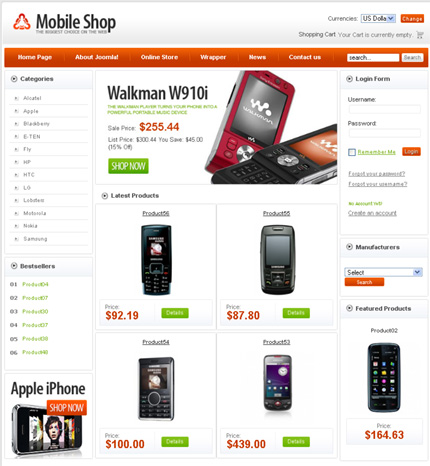
VirtueMart is an Open Source E-Commerce solution to be used together with a Content Management System (CMS) called Joomla!. Joomla! and VirtueMart are written in PHP and can be used in typical PHP/MySQL environments. Vast variety of available modules, plugin and components gives yoг the opportunity to extend the functionality of your online store.
VirtueMart templates allow you to change the design and layout of your store fast and easily.
Read More...
Author: Template-help.com Team

Template ID: 31676
After Effects Logo Reveals are the latest media product - they ensure the most spectacular way for your logos to appear. You may put them to a good use in TV ads and ads in cinema, on widescreens in public places (either outdoors or indoors), on your website as a mini intro or for any other purpose you can possibly imagine! The ways you may use these After Effects logo reveals are truly limitless because of high technical quality of this product (HD quality and premium design). Hurry up to browse our collection!
Unfortunately the template Live Demo and Sample Template download are temporary unavailable.
Read More...
Author: Template-help.com Team

Template ID: 26684
After Effects intros professionally developed by the expert team are now offered to our vast audience. Being available in full HD quality (HD1080) with stock videos and footages included, After Effects Intros could be seamlessly deployed to create awesome media and video outcomes including special effects creation, video post-production, TV and broadcasting purposes or video ads production.
Unfortunately the template Live Demo and Sample Template download are temporary unavailable.
Read More...
Author: Template-help.com Team
A SWiSH Template is a fully animated template based on SWISH technology. A SWiSH website will impart your Company's appearance with the dynamic energy and your visitor will reveal the uniqueness of your webpage. SWiSH Templates can be edited with a SWiSH Editor. To make changes to SWiSH Templates You need an .SWI file which is provided with any of our SWiSH Templates. Besides the .SWI file you will get the .SWF, the .PSD and the .HTML files to make your work with our SWiSH Templates extremely easy.
Unfortunately the template Live Demo and Sample Template download are temporary unavailable.
Read More...
Author: Template-help.com Team

Template ID: 23083
PSD template is a single PSD file with hight quality and eye-catching design. The template does not contain any html layout, css style or programming. It if offered specifically for web-developers and could be used to create any website using any e-commerce, CMS or blog engine.
Unfortunately the template Live Demo and Sample Template download are temporary unavailable.
Read More...
Author: Template-help.com Team
Template ID: 30847
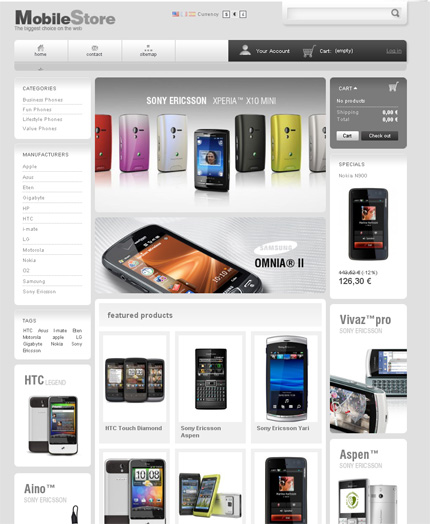
Prestashop template is a theme for Prestashop e-commerce solution. It provides you with vast variety of customization opportunities and allows you to create an online store that fully meet your needs.
PrestaShop is an e-commerce solution which is free for the basic kernel and open source. It supports payment gateways such as Google checkout, paypal or payments pro via APIs.
PrestaShop is available under the Open Software License and officially launched in August 2007 for small to medium-sized businesses. The software, which is based on the Smarty template engine, is used by several thousands of shops worldwide.
Read More...
Author: Template-help.com Team

Template ID: 24224
PowerPoint templates are designs for Microsoft PowerPoint presentations that will help you to create a stunning presentations to imporess any audience. Highly customizable and could be used for any kind of presentation.
Read More...
Author: Template-help.com Team
Starting from template #31985 VirtueMart templates are compatible with VirtueMart 1.1.6 VirtueMart 1.1.6 Fixes and Updates Old Price in PDF not correctly styled bug in checking stock Very long time open goods in category PayPal (old method) data array Some …
Read More...
Author: Template-help.com Team
Starting from Magento template #31965 Magento templates will be offered only with English language included. All other languages should be installed separately. In case you need more Magento localizations installed please visit the Magento official website at magentocommerce.com There from …
Read More...
Author: Template-help.com Team
Starting from the template #31726 osCommerce templates will be compatible with osCommerce 2.3.1 Changes The following changes are included in this release: Confirm new Product Reviews to the customer Fix a PHP notice in Phpass Fix Reviews Box language definition …
Read More...
Author: Template-help.com Team
Category: Uncategorized
Without exception we charge the customer only for the amount of the order exactly as it is shown in the shopping cart. The only difference that might occur relates to a double charge for currency conversion that was applied by …
Read More...
Author: Template-help.com Team
Category: Uncategorized
In accordance with our Terms of Use and Refund Policy we maintain a no-refund and no-exchange policy because of the specific nature of the product that we provide. Technically, there can be no situation when a “wrong template” is delivered. …
Read More...
Author: Template-help.com Team
Category: Uncategorized
Moneybookers.com provides excellent methods for making payment. You will find several advantages to making payments through this gateway because you only need an email address to qualify. The payment is processed instantly. You must first register on their website www.moneybookers.com. …
Read More...
Author: Template-help.com Team
Category: Uncategorized
Unfortunately, we do have the option to take orders by telephone. However, we do provide many alternative forms of payment. Please visit our Help Center here to learn more about these methods. We do not accept payment by check. However, …
Read More...
Author: Template-help.com Team
Category: Uncategorized
Citizens of the EU can use a Wire Transfer for payment. Order by Wire Transfer is a third party wire transfer provider, and because of IBAN/BIC agreements, bank wire transfers from within the EU can be made at local (domestic) …
Read More...
Author: Template-help.com Team
Category: Uncategorized
CVV stands for Credit Card Verification Value. The CVV is a 3 or 4 digit code embossed or imprinted on the signature panel on the reverse side of Visa, MasterCard and Discover cards and on the front of American Express …
Read More...
Author: Template-help.com Team
Category: Uncategorized
Apparently your order status is pending. Your payment may have been delayed for one of several reasons. First, you need to be sure that you have already sent enough money to your online Moneybookers.com account to cover the amount of …
Read More...
Author: Template-help.com Team
Category: Uncategorized
SMS is the short message service provided by your cell phone operator. Moneybookers.com sends a verification code to your cell phone to verify your credit card. Please, make sure your cell phone supports SMS. Note, if you do not get …
Read More...
Author: Template-help.com Team
Category: Uncategorized
WebMoney is an integrated payment option that enables you to make money transfers in real time, provided that you have Internet money in accounts such as E-Gold, WMZ etc. When choosing this payment method, you will be transferred to roboxchange.com …
Read More...
Author: Template-help.com Team
Category: Uncategorized
Customers with credit cards that do not have CVV2 codes can simply leave the CVV2 field blank on our order page. If the card is supposed to have the CVV2 code, then the order will fail, and the buyer will …
Read More...
Author: Template-help.com Team
Category: Uncategorized
Our company accepts most major credit cards. You may use Visa, MasterCard, Discover, American Express, Dinners, JCB and debit cards with the Visa or MasterCard logo. Also we accept payment via 2Checkout.com and Chronopay.com . They accepts VISA, American Express, …
Read More...
Author: Template-help.com Team
Category: Uncategorized
In order to know exactly why the purchase failed we would need to have the exact error message you are receiving. However, we advise you to contact your issuing bank and confirm that the failure is not related to problems …
Read More...
Author: Template-help.com Team
Category: Uncategorized
To provide our customers with different payment methods we process orders through several well respected and extremely reliable companies: RBS Worldpay, Google Checkout, PayPal and Moneybookers. All of these companies use SSL protected areas. This means all the data you …
Read More...
Author: Template-help.com Team
Category: Uncategorized
Depending on which payment method you choose, the charge for your order will be shown on your billing statement in a different way. It may appear as “template-help.com” or “checkanbill” for “Chronopay.com”. It will appear as “2CO” for “2Checkout.com”. Please, …
Read More...
Author: Template-help.com Team
Category: Uncategorized
Unfortunately, we do not accept Solo cards. Please, refer to this article to see which credit cards are accepted. And you can read an article about Moneybookers.com and Wire Transfers as alternative types of payment . PayPal is accepted on …
Read More...
Author: Template-help.com Team
Category: Uncategorized
First, make sure that you have submitted your e-mail address correctly for delivery purposes. Second, please check your email “Bulk/Junk” folder to see if the e-mail has been held by your anti-spam filters. The delivery e-mail was sent to you …
Read More...
Author: Template-help.com Team
Category: Uncategorized
Please contact our billing department and provide us with your correct email. We will send the link to your corrected email address immediately! Billing Chat: www.template-help.com/chat Submit a Ticket: esupport.template-help.com Phone: 1-518-312-4171, 1-518-320-8714
Read More...
Author: Template-help.com Team
Category: Uncategorized
Q: I get the message “link is inactive” when I click on this link. A: Please contact our Friendly Support Team and provide your purchase info (one of the following: your email address, transaction ID, merchant system order number, or …
Read More...
Author: Template-help.com Team
Category: Uncategorized
Q: My computer has crashed and I have lost my templates! Is there any way I can re-download? A: Please contact our Friendly Support Team and provide your purchase info (one of the following: your email address, transaction ID, merchant …
Read More...
Author: Template-help.com Team
Category: Uncategorized
Make sure that you don’t have firewall restrictions that prohibit this download. Try to use this link on another computer. If it still doesn’t work, please contact our Support to get another link.
Read More...
Author: Template-help.com Team
Category: Uncategorized
The following are some probable reasons why the template did not reach you on time. They are: Incorrect Email Address: If you typed in an incorrect email address by mistake when filling out the registration form the download could not …
Read More...


