

This is a Script that allows you to add special effects to your website page menu. All of these effects are based on the smooth movement of a menu item background image. The most common case is when the background image is a smooth color gradient. But you can use other effects as well.
JavaScript
In order to make the script work, the index-#.html file with the menu should contain these lines of HTML code:

The menu.js file contains these lines of code that initialize the script functionality:
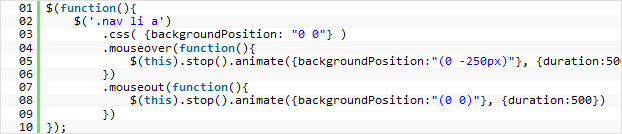
Here the script attributes define the following values:
• backgroundPosition: “(0 -250px)” – maximum width of the slide when it’s opened;
• duration: 500 – total animation duration;
Script is smoothly changing backgroundPosition value, thus menu background animates. Here the animation effect is added to bulleted list with .nav class.
HTML
Below you can see the HTML script representation:

A bulleted list is used to create a menu.
CSS
You can find script related stylesheet in the main style.css file. You will need to modify the following styles:

It is important to specify an active class (.active) for a menu item on a correspondent page.
