Language

  • English
  • Español
  • Russian

Top Menu

  • Live Chat
  • Submit a ticket
  • Sample Templates
  • Testimonials
  • Contact Us
 

Knowledgebase and documentation
If you have TEMPLATE-HELP.COM on your cardholder's statement and don't recognize it, please contact billing@template-help.com
  • Web templates
    • 3 Color Templates
      • Product Description
      • Tutorials
    • CSS Templates
      • Product Description
      • Tutorials
    • Dynamic Flash
      • Product Description
      • Tutorials
    • Dynamic Flash Photo Gallery
      • Product Description
      • Tutorials
      • Updates & Innovations
    • Flash Animated Templates
      • Product Description
      • Tutorials
    • Flash CMS Intro
      • Product Description
      • Tutorials
    • Flash Intro Templates
      • Product Description
      • Tutorials
    • Flash Templates
      • Product Description
      • Quick Start Guide
      • Tutorials
    • Dynamic SWISH Templates
      • Product Description
      • Tutorials
    • Full Package Templates
      • Product Description
      • Tutorials
    • Full Site templates
      • Product Description
      • Quick Guide
      • Tutorials
    • JS Animated
      • Product Description
      • Tutorials
    • PSD Templates
      • Product Description
      • Tutorials
    • Razor Templates
      • Product Description
    • Stretched Template
      • Product Description
      • Tutorials
    • SWISH Animated templates
      • Product Description
      • Tutorials
    • Swish Templates
      • Product Description
      • Tutorials
    • XML Flash Templates
      • Product Description
      • Tutorials
    • PRO templates
      • Product Description
    • Responsive web templates
      • Product Description
  • E-commerce Templates
    • Prestashop
      • Product Description
      • Quick Start Guide
      • Tutorials
      • Updates & Innovations
    • Magento
      • Product Description
      • Quick Guide
      • Tutorials
      • Updates & Innovations
    • OsCommerce
      • Product Description
      • Quick Guide
      • Tutorials
      • Updates & Innovations
    • VirtueMart
      • Product Description
      • Quick Guide
      • Tutorials
      • Updates & Innovations
    • ZenCart
      • Product Description
      • Quick Guide
      • Tutorials
      • Updates & Innovations
    • CRE Loaded
      • Product Description
      • Tutorials
      • Updates & Innovations
    • OpenCart
      • Product Description
      • Updates and Innovations
      • Tutorials
    • E-Commerce Comparison
    • E-commerce templates compatibility table
  • CMS & Blog Templates
    • Wordpress
      • Product Description
      • Quick Guide
      • Tutorials
      • Updates & Innovations
    • Joomla!
      • Product Description
      • Quick Guide
      • Tutorials
      • Updates & Innovations
    • Drupal
      • Product Description
      • Quick Start Guide
      • Tutorials
      • Updates & Innovations
    • Mambo
      • Product Description
    • PhpBB
      • Product Description
      • Tutorials
    • Php-Nuke
      • Product Description
      • Tutorials
    • Tumblr templates
      • Tutorials
    • CMS Comparison
    • CMS Product versions compatibility
  • Corporate Design
    • Corporate Identity
      • Product Description
      • Tutorials
    • Icon Set
      • Product Description
      • Tutorials
    • Logo Set
      • Product Description
      • Tutorials
    • Logo Templates
      • Product Description
      • Tutorials
    • PowerPoint Templates
      • Product Description
      • Tutorials
  • Silverlight
    • Silverlight Templates
      • Product Description
      • Tutorials
    • Silverlight Intro
      • Product Description
  • Video Templates
    • After Effects Intros
      • Product Description
      • Tutorials
    • After Effects Logo Reveals
      • Product Description
      • Tutorials
    • VideoSmash
      • Tutorials
  • Facebook Layouts
    • Facebook Flash Templates
      • Product Description
      • Tutorials
    • Facebook HTML Templates
      • Tutorials
    • Facebook Reveal Template
      • Product Description
      • Tutorials
    • Updates & Innovations
 

Pre-Sale Questions

  • Pre-Sale Questions
    • Pre-Sale FAQ
    • After Sale Support
    • Copyright & Template Usage
    • Licensing Questions
  • Billing Questions
 

General Tutorials

  • Developer Tools
  • Hosting FAQ
  • Working with CSS
  • Working with Photoshop
  • Working with HTML
  • Working with Files
  • Working with Flash
  • Working with JQuery
  • Working with fonts
  • Working with XML Flash
  • Working with Swish
 

How to change a logo

  • Author: Template-help.com Team
  • Posted on: November 15, 2010
  • Relation: Layout
  • Complexity: Low
  • Tags: image, logo, Prestashop
GD Star Rating
a WordPress rating system
 

This tutorial shows how to change logo for your PrestaShop store.

To change logo open your PrestaShop admin panel and go to Preferences > Appearance page.
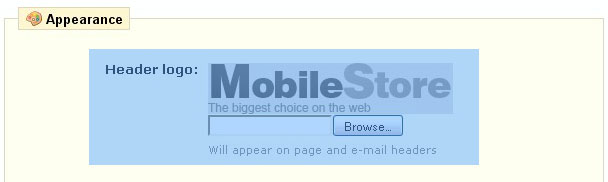
Upload your logo image and click Save button to keep your changes.

Your logo should be saved in JPG format and called logo.jpg

In case you want to use different filename and format open header.tpl file from the themes\theme### directory of your PrestaShop installation, locate the following code:

				<h1 id="logo">
                	<a href="{$base_dir}" title="{$shop_name|escape:'htmlall':'UTF-8'}">
                    	<img src="{$content_dir}/themes/prestashop_sample/img/logo.jpg" alt="{$shop_name|escape:'htmlall':'UTF-8'}" />
                    </a>
                </h1>

And replace the logo image file to your one.

For more details please check the video tutorial below

This entry was posted in E-commerce Templates, PrestaShop, PrestaShop Tutorials and tagged image, logo, Prestashop. Bookmark the permalink.

Related posts:

  1. How to change a logo
  2. How to change the logo
  3. How to change a favicon
  4. How to change the main page content
  5. How to manage banners

Submit a ticket

If you are still unable to find a sufficient tutorial regarding your issue please use the following link to submit a request to our technical support team. We'll provide you with our help and assistance within next 24 hours: Submit a ticket

Copyright 2003-2012 Template-help.com All rights reserved.