Язык

  • English
  • Español
  • Russian

Top Menu

  • Live Chat
  • Submit a ticket
  • Sample Templates
  • Testimonials
  • Contact Us
 

Knowledgebase and documentation
If you have TEMPLATE-HELP.COM on your cardholder's statement and don't recognize it, please contact billing@template-help.com
  • Web templates
    • 3 Color Templates
      • Product Description
      • Tutorials
    • CSS Templates
      • Product Description
      • Tutorials
    • Dynamic Flash
      • Product Description
      • Tutorials
    • Dynamic Flash Photo Gallery
      • Product Description
      • Tutorials
      • Updates & Innovations
    • Flash Animated Templates
      • Product Description
      • Tutorials
    • Flash CMS Intro
      • Product Description
      • Tutorials
    • Flash Intro Templates
      • Product Description
      • Tutorials
    • Flash Templates
      • Product Description
      • Quick Start Guide
      • Tutorials
    • Dynamic SWISH Templates
      • Product Description
      • Tutorials
    • Full Package Templates
      • Product Description
      • Tutorials
    • Full Site templates
      • Product Description
      • Quick Guide
      • Tutorials
    • JS Animated
      • Product Description
      • Tutorials
    • PSD Templates
      • Product Description
      • Tutorials
    • Razor Templates
      • Product Description
    • Stretched Template
      • Product Description
      • Tutorials
    • SWISH Animated templates
      • Product Description
      • Tutorials
    • Swish Templates
      • Product Description
      • Tutorials
    • XML Flash Templates
      • Product Description
      • Tutorials
    • PRO templates
      • Product Description
    • Responsive web templates
      • Product Description
    • Bootstrap Templates
      • Product Description
      • Tutorials
  • E-commerce Templates
    • Prestashop
      • Product Description
      • Quick Start Guide
      • Tutorials
      • Updates & Innovations
    • Magento
      • Product Description
      • Quick Guide
      • Tutorials
      • Updates & Innovations
    • OsCommerce
      • Product Description
      • Quick Guide
      • Tutorials
      • Updates & Innovations
    • VirtueMart
      • Product Description
      • Quick Guide
      • Tutorials
      • Updates & Innovations
    • ZenCart
      • Product Description
      • Quick Guide
      • Tutorials
      • Updates & Innovations
    • OpenCart
      • Product Description
      • Quick Start Guide
      • Updates and Innovations
      • Tutorials
    • Jigoshop
      • Product Description
      • Tutorials
    • CRE Loaded
      • Product Description
      • Tutorials
      • Updates & Innovations
    • E-Commerce Comparison
    • E-commerce templates compatibility table
  • CMS & Blog Templates
    • Wordpress
      • Product Description
      • Quick Guide
      • Tutorials
      • Updates & Innovations
    • Joomla!
      • Product Description
      • Quick Guide
      • Tutorials
      • Updates & Innovations
    • Drupal
      • Product Description
      • Quick Start Guide
      • Tutorials
      • Updates & Innovations
    • Mambo
      • Product Description
    • PhpBB
      • Product Description
      • Tutorials
    • Php-Nuke
      • Product Description
      • Tutorials
    • Tumblr templates
      • Tutorials
    • CMS Comparison
    • CMS Product versions compatibility
  • Corporate Design
    • Corporate Identity
      • Product Description
      • Tutorials
    • Icon Set
      • Product Description
      • Tutorials
    • Logo Set
      • Product Description
      • Tutorials
    • Logo Templates
      • Product Description
      • Tutorials
    • PowerPoint Templates
      • Product Description
      • Tutorials
  • Silverlight
    • Silverlight Templates
      • Product Description
      • Tutorials
    • Silverlight Intro
      • Product Description
  • Video Templates
    • After Effects Intros
      • Product Description
      • Tutorials
    • After Effects Logo Reveals
      • Product Description
      • Tutorials
    • VideoSmash
      • Tutorials
  • Facebook Layouts
    • Facebook Flash Templates
      • Product Description
      • Tutorials
    • Facebook HTML Templates
      • Tutorials
    • Facebook Reveal Template
      • Product Description
      • Tutorials
    • Updates & Innovations
 

Pre-Sale Questions

  • Pre-Sale Questions
    • Pre-Sale FAQ
    • After Sale Support
    • Copyright & Template Usage
    • Licensing Questions
  • Billing Questions
 

General Tutorials

  • Developer Tools
  • Hosting FAQ
  • Working with CSS
  • Working with Photoshop
  • Working with HTML
  • Working with Files
  • Working with Flash
  • Working with JQuery
  • Working with fonts
  • Working with XML Flash
  • Working with Swish
 

PrestaShop. Как изменить лого

  • Author: Template-help.com Team
  • Posted on: Ноябрь 15, 2010
  • Relation: Layout
  • Complexity: Low
  • Метки: image, logo, Prestashop
GD Star Rating
a WordPress rating system
 

Этот туториал покажет, как изменить лого в шаблоне PrestaShop.

Чтобы изменить лого, откройте админ-панель, Preferences > Appearance (Настройки — дизайн).
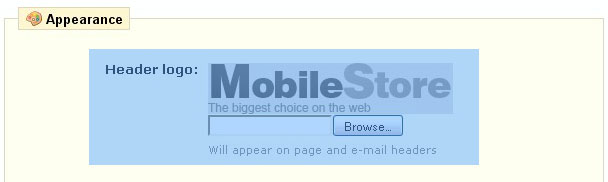
Загрузите лого и нажмите Save, чтобы сохранить изменения.

Ваше лого будет сохранено в формате JPG и будет иметь имя logo.jpg

В случае, если Вы хотите иметь другое имя файла или другое расширение, откройте файл header.tpl из папки themes/theme###, найдите следующий код:

				<h1 id="logo">
                	<a href="{$base_dir}" title="{$shop_name|escape:'htmlall':'UTF-8'}">
                    	<img src="{$content_dir}/themes/prestashop_sample/img/logo.jpg" alt="{$shop_name|escape:'htmlall':'UTF-8'}" />
                    </a>
                </h1>

И замените название файла на необходимое.

Пожалуйста, ознакомьтесь с детальным, обучающим видео ниже:

This entry was posted in E-commerce Templates, PrestaShop, PrestaShop Tutorials and tagged image, logo, Prestashop. Bookmark the permalink.

Related posts:

  1. osCommerce. Как изменить логотип
  2. How to change the logo
  3. PrestaShop. Как изменить favicon
  4. PrestaShop. Как изменить контент главной страницы
  5. Prestashop. Как работать с баннерами

Submit a ticket

Если вы не смогли найти подходящее решение проблемы, пожалуйста воспользуйтесь следующей ссылкой, чтобы отправить запрос команде технической поддержки.
Отправить запросВы получите ответ в течение 24 часов

Copyright 2003-2012 Template-help.com All rights reserved.