- Open the .FLA file, located in the “sources/flash” folder.
- On the time line, locate the layer with the name “popup”, “readmore” or “pages_readmore”
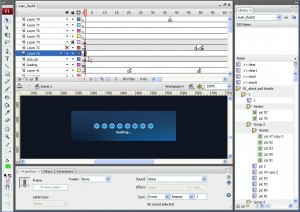
- Under the “popup” layer, there is a layer with the script, click on it and press F9 key to open the “Actions” panel.
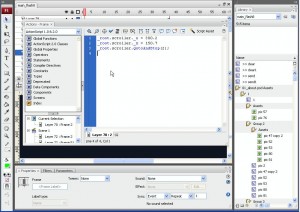
- This is the script, which is responsible for X and Y coordinates of the “pop-up” window position. Simply change the default values of 300 and 150 to the desired ones.
Note: Do not change the figures after the point.
- Publish your .FLA file to see the changes.
- Веб-Шаблоны
- 3-х Цветные Шаблоны
- CSS Шаблоны
- Динамический Флэш
- Динамическая Флеш Фото Галерея
- Flash анимированные шаблоны
- Flash CMS Intro
- Шаблоны Flash Intro
- Flash шаблоны
- Шаблоны Dynamic Swish
- Full Package шаблоны
- Многостраничные шаблоны
- JS-анимированный шаблон
- PSD-шаблон
- Razor-шаблоны
- Резиновые шаблоны
- SWiSH анимированные шаблоны
- SWiSH шаблоны
- Flash XML шаблоны
- PRO шаблоны
- Адаптивные шаблоны
- Bootstrap шаблоны
- Шаблон интернет-магазина
- Шаблоны для CMS и блогов
- Корпоративный стиль
- Silverlight
- Видео шаблоны
- Facebook макеты
