

This tutorial will teach you how to create a very simple contact form for HTML based website template.
First of all create 2 files: contact_form.html and contact.php. The first file will contain HTML code for the form and the second -will process the data from the form
HTML
Below is the HTML code of the contact form
<form action="contact.php" method="post">
	Your name
    <input type="text" name="cf_name">
	Your e-mail
    <input type="text" name="cf_email">
	Message
    <textarea name="cf_message">
	<input type="submit" value="Send">
	<input type="reset" value="Clear">
</form>
And this is how it will look in the browser
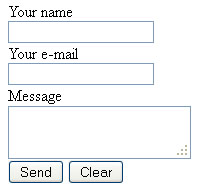
Let’s have a quick look at some main aspects of it. The <form> tag should have 2 additional attributes:
action=”contact.php” – this attribute specifies where to send the data from the contact form fields, when it has been submitted
method=”post” – this attribute specifies how to send data from the form to the file specified in the action attribute
The <input> and <textarea> tags should have an attribute “name” with a unique identifier. This attribute is used to identify form data after it has been submitted to the server
And the 2 input elements that are used as Submit and Clear buttons, one should have type=”submit” assigned to it and the other type=”reset”
That’s basically it. As easy as it looks
PHP
Now for the contact.php file that will actually grab the data from the fields, compose into a message and send to your email. You can download contact.php file from this link. Below is the code of the file with comments to its major sections.
Assigning the data sent from the contact form fields (cf_name, cf_email, cf_message) to php variables ($cf_message, $field_email, $field_message)
$field_name = $_POST['cf_name'];
$field_email = $_POST['cf_email'];
$field_message = $_POST['cf_message'];
$mail_to shall contain the site owner email, this is where the email is sent to. You can specify multiple emails by separating them with a comma (e.g. mail-one@template-help.com, mail-two@template-help.com)
$mail_to = 'test@test-mail.com';
Subject of the email you receive from the contact form
$subject = 'Message from a site visitor ' . $field_name;
Constructing the body of the message
$body_message = 'From: '.$field_name."\n";
$body_message .= 'E-mail: '.$field_email."\n";
$body_message .= 'Message: '.$field_message;
Constructing the headers of the message
$headers = "From: $cf_email\r\n";
$headers .= "Reply-To: $cf_email\r\n";
Defining mail() function and assigning it to a variable $mail_status, which is used below to check whether the mail has been sent or not
$mail_status = mail($mail_to, $subject, $body_message, $headers);
If the mail() function executed successfully then do the code below
if ($mail_status) { ?>
	<script language="javascript" type="text/javascript">
		// Print a message
		alert('Thank you for the message. We will contact you shortly.');
		// Redirect to some page of the site. You can also specify full URL, e.g. http://template-help.com
		window.location = 'contact_page.html';
	</script>
<?php
}
If the mail() function fails, then execute the following code
else { ?>
	<script language="javascript" type="text/javascript">
		// Print a message
		alert('Message failed. Please, send an email to gordon@template-help.com');
		// Redirect to some page of the site. You can also specify full URL, e.g. http://template-help.com
		window.location = 'contact_page.html';
	</script>
<?php
}?>
You can also download compiled contact_form.html and contact.php files in a single package
Proceed to the tutorial on how to add fields to the contact form
Hello,
1st thanks,
When I try this code (how to create a contact form), I got the following error:
Warning: mail() [function.mail]: Failed to connect to mailserver at “localhost” port 25, verify your “SMTP” and “smtp_port” setting in php.ini or use ini_set() in D:\XAMPP\xampp\htdocs\Own_Work_Comp\Company_Site\contact.php on line 11
Failure
The contact form script can be used only on a live server. You are using it on your local server (XAMP based).
In order to make it work you need to upload it to the live server (order hosting) or configure mail server on your XAMP localhost
Hi
your tutorial is very easy understand and viable, but I have a question about how to make contact.php when contact form have a drop down selection. thanks if you can have any help.
Bill
I used this form and I like that it is simple but I need to make some fields to be “required” how can I do this using this form?
The tutorial on how to create required fields will be added in nearest future
Thanks, could you post the link for that tutorial on a comment here(when that tutorial will be available)?
Hi, after 10 minutes of trials and errors I managed to do that on the host it’s very simple. I don’t even know how do i made errors at all, maybe i’m just don’t pay enough attention. So if someone is failing at doing this, here’s the tip: Read EVERY WORD in this tutorial… And thanks to Gordon for the tutorial.
Hi. do i need to have installed a mail server on my web server for this to work? I have set it up like its shown in the tutorial, and i get the “tank you for the message i will contact you shortly”, but no mail to the mail to address. Is there something i`m missing. What are the requirements for this form to work?
Most local servers do not include mail server, so you’ll need to install some additional software for that. Though there are many risks connected with that, so I suggest you test the form on a live server.
If you don’t have a host and a domain yet, then google for some free hosting providers. There are many on the web and most of them support php mail() function
i need a form box that will email back to my email account. I have the box part which it was easy but i can’t email my account to me. Please help me.
Hi,
The tutorial is very easy. Thanx to gordon.
But i am facing a problem. When i amsubmitting the form it only prompts “Message failed,please send an email to me”.
It is not emailing the contents to me.
Jaswant
Might be that your server does not support PHP mail() function, so the script fails. Though this also can be some server specific configuration, which does not allow execution of the script. In general this should be investigated on the server side
Another common problem is that some hosts, require all PHP mails to specify a FROM: and TO: address that is in your own domain.
E.g. if your site is ww w.mydomain.com then the email you use in the form can be only {some-name}@mydomain.com
A solution to this would be deleting the $headers variable from the mail(…) function
Tks just looking ill try it when I get home sounds simple tks again
Great, there are actually some great tips on here that my customers might find this relevant, I will email them a link. Thanks