

This tutorial will show you how to update the WordPress theme design through the PSD files using the Adobe photoshop software.
Some parts of the design are created with images so they could be modified through Adobe Photoshop software. All templates are provided with the sources PSD files so you are free to perform any design changes you need.
Please check this detailed video tutorial on how to update the design through Adobe Photoshop.
How to change color scheme (images)
Here are some useful tips:
1. The template PSD files are stored in the sources/psd folder from the template package.
2. Go to View > Show > Slices to display all slices used in the template. Each slice is a separate image used in the design.
3. Do NOT save all slices at a time. Save only the modified slices step-by-step.
4. Your Save for Web settings should be as follows:
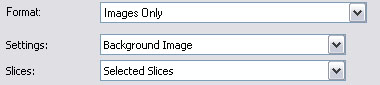
5. The slice you save should be above all other slices and should not contain any other slices within it’s borders. Use Bring To Front button to put it over all others.


