Opening an HTML file

To open an HTML file with HTML editor you should select “File/Open” from top menu and browse to the location of your HTML file. Another way to open file is just drag and drop it from file browser to your HTML editor window.
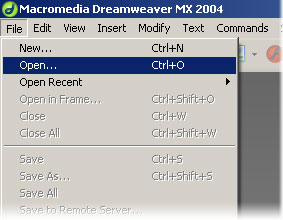
Other ways of file opening, such as copy and paste, may cause HTML structure damage and are not recommended.

VN:F [1.9.6_1107]
Rating: +1 (from 1 vote)
This entry was posted in Working with HTML and tagged . Bookmark the permalink.
 

  • Submit a ticket

    If you are still unable to find a sufficient tutorial regarding your issue please use the following link to submit a request to our technical support team. We'll provide you with our help and assistance within next 24 hours: Submit a ticket


Track the comments

Leave a Reply

Your email address will not be published. Required fields are marked *

*

You may use these HTML tags and attributes: <a href="" title=""> <abbr title=""> <acronym title=""> <b> <blockquote cite=""> <cite> <code> <del datetime=""> <em> <i> <q cite=""> <strike> <strong>


Please DO NOT post the order details or any personal details in the comment body.

Spam Protection by WP-SpamFree