
Just Host Web Hosting Help
Email Setup with Outlook 2003
Problem:
Configuring your email client: Outlook 2003
Solution:
That's it, you're done!
- Open Outlook 2003.
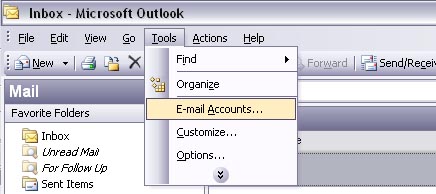
- Click the 'Tools' menu, and select 'Email Accounts.'
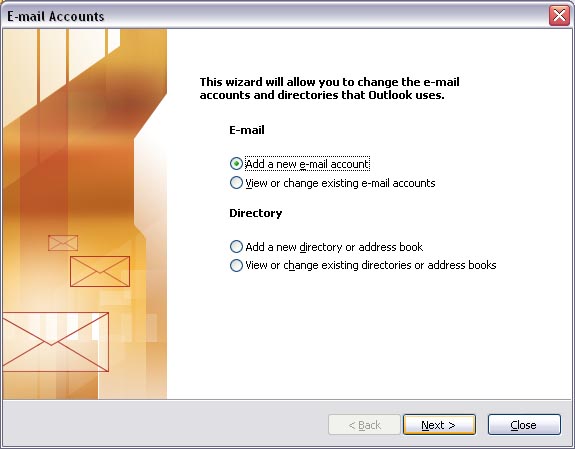
- Select 'Add a new e-mail account,' then click 'Next.'
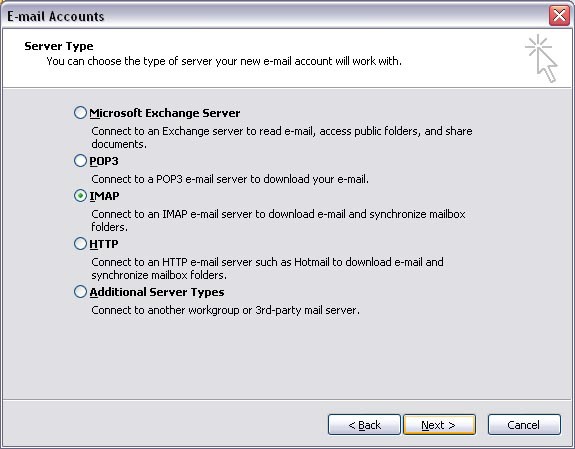
- Select 'IMAP,' then click 'Next.'
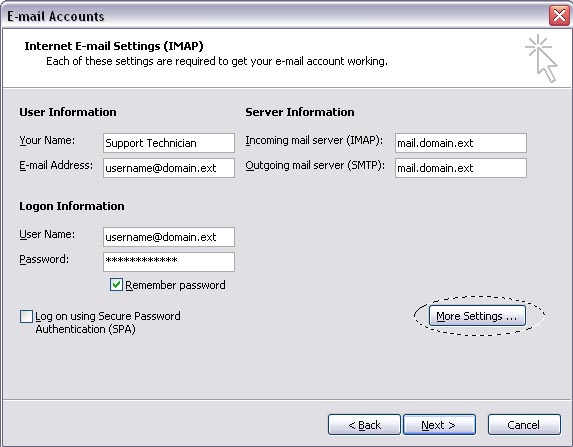
- Setup the Account.
- Enter 'Your Name' as you would like it to appear.
- Enter your 'E-mail Address' in the form of 'username@yourdomain.com' (replace with your e-mail addresss). If you need to create an email address on Just Host, Click Here.
- Enter 'mail.yourdomain.com' (replace yourdomain.com with your domain) in the 'Incoming Mail Server' (IMAP) field.
- Enter 'mail.yourdomain.com' (replace yourdomain.com with your domain) in the 'Outgoing Mail Server' (SMTP) field.
- Enter your full e-mail address (in the form of username@yourdomain.com) in the 'User Name' field.
- Enter your password (for the e-mail account, not the password you use to log into the Control Panel) in the 'Password' field.
- Click 'More Settings.'
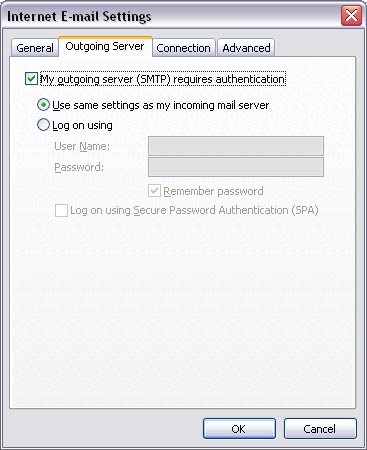
- Click on the 'Outgoing Server' tab.
- Put a check next to 'My outgoing server (SMTP) requires authentication.' Make sure that 'Use same settings as my incoming mail server' is selected.
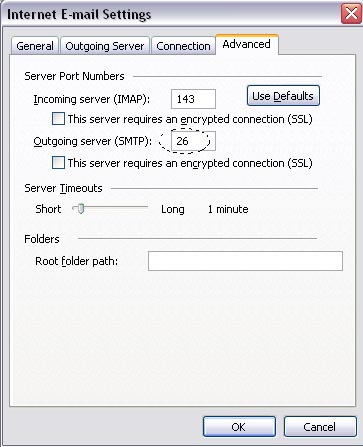
- Click the 'Advanced' tab.
- Change the 'SMTP' port to be 26.
- Click 'OK.'
- Click 'Next.'
- Click 'Finish.'
If you have trouble sending mail, please Click Here to view our article on how to change the email SMTP port from 25 to 26.
Knowledgebase Article
 120,577 views
 bookmark
 share
share
 tags: configuration configure email imap outlook pop setup
(updated 1116 days ago)
tags: configuration configure email imap outlook pop setup
(updated 1116 days ago)
120,577 views
bookmark
share
 E-mail
 Twitter
 Google Bookmarks
 Facebook
 MySpace
 Digg
Digg Reddit
 Delicious
 LinkedIn
 StumbleUpontags: configuration configure email imap outlook pop setup
(updated 1116 days ago)
StumbleUpontags: configuration configure email imap outlook pop setup
(updated 1116 days ago)
Recommended Help Content
Configuring your email client: Outlook Express. (updated 194 days ago)
Knowledgebase Article
129,819 views
tags: configuration configure email express imap outlook pop setup
129,819 views
tags: configuration configure email express imap outlook pop setup
You can try sending the email on port 26, which is an alternate SMTP port and see if that works for you. For outlook: (updated 87 days ago)
How to setup an email account using Microsoft Outlook 2013 (updated 87 days ago)
Related Help Content
Just Host offers numerous email options. (updated 729 days ago)
Where do I Add, Delete and Manage Email Accounts? (updated 729 days ago)
Knowledgebase Article
173,859 views
tags: accounts add change client configure delete email imap macmail mail mailbox manage outlook password ports thunderbird
173,859 views
tags: accounts add change client configure delete email imap macmail mail mailbox manage outlook password ports thunderbird
How do I add my Just Host email account to Outlook 2002? (updated 555 days ago)
How do I configure email accounts in Outlook 2000? (updated 1408 days ago)
How to Configure Eudora Pro to Access Email? (updated 1390 days ago)
There are many third-party E-mail programs that can be used to connect to your E-mail accounts from remote computers. The most common E-mail programs, called Clients, are Outlook, Mac Mail, and Mozil (updated 205 days ago)
Configuring your email client: Thunderbird (Mozilla) (updated 250 days ago)
All of my email folders are missing. How can I get them to show up? (updated 982 days ago)