
Just Host Web Hosting Help
Email Accounts - Change the Mailbox Size Quota
You can easily update the quota or disk space limit for an email account. This article will explain how to make this change.
Changing the quota of an email account
- Log into your Just Host Control Panel.
- Open the Email Accounts tool, located in the Mail section of the cPanel.
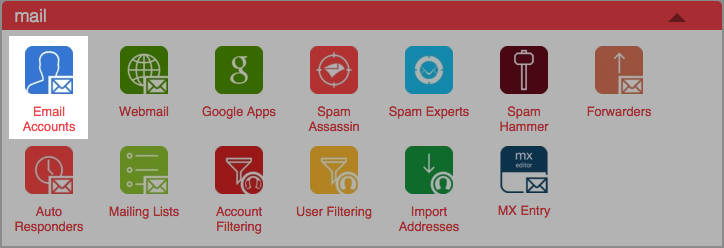
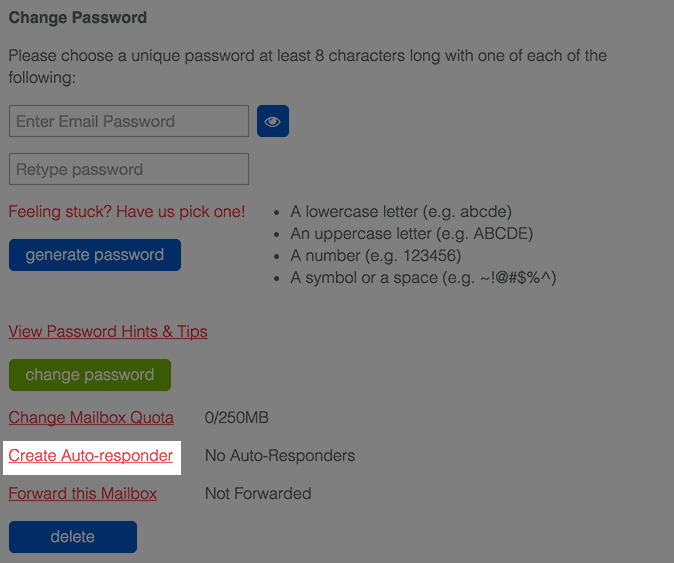
- Click Details to the right of the email account.

- Click Change Mailbox Quota
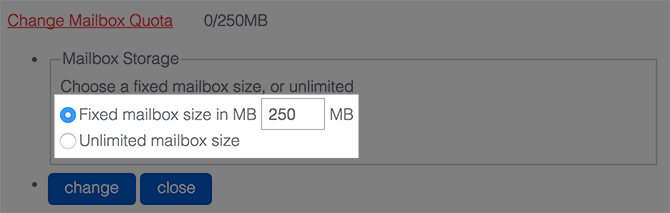
- Enter the new quota for the email account.
- Click the Change button to save the new quota.
Knowledgebase Article
 287,973 views
 bookmark
 share
share
 tags: account change decrease email increase mailbox quota size
287,973 views
bookmark
share
 E-mail
 Twitter
 Google Bookmarks
 Facebook
 MySpace
 Digg
Digg Reddit
 Delicious
 LinkedIn
 StumbleUpontags: account change decrease email increase mailbox quota size
Recommended Help Content
Trying to send out emails from multiple email accounts fail from both webmail and third party email clients. Possible Reasons: The maximum emails per hour has been exceeded. This can be caused by forw
Knowledgebase Article
437,963 views
tags: email exceeded mailbox outlook quota receive receiving send sender unable
437,963 views
tags: email exceeded mailbox outlook quota receive receiving send sender unable
Learn how to create an email account associated with your domain name
How to use use the FTP Account tool to create additional FTP Accounts. This is useful for granting FTP access to your account without giving anyone your cPanel password.
Video "How-to" Tutorial
943,537 views
tags: account accounts cpanelutilities ftp login publish upload
943,537 views
tags: account accounts cpanelutilities ftp login publish upload
Related Help Content
Can I send an email with large files/attachments?
How can I change the primary domain name on my account?
Account level Filters.
How do I increase my file size limit in my PHP application?
This article will explain how to mount additional storage on a Dedicated or VPS Server.
Learn how to check your email accounts from within Gmail. This tutorial will show you how to setup a POP account in GMail.
How do I migrate an IMAP email account?
I received an email that my account was migrating; when I log in, my interface looks different. Why did this change? This article will cover some commonly asked questions about the new experience.