
Just Host Web Hosting Help
Email not sending from Client or Webmail
Problem:
Trying to send out emails from multiple email accounts fail from both webmail and third party email clients.
Possible Reasons:
- The maximum emails per hour has been exceeded. This can be caused by forwarders or by mailing lists. The default is 150 per hour. Feel free to contact us via Phone, Live Chat or by Opening a Ticket if you would like this increased. Please include detailed information regarding why you need the limit increased.
- This can be caused if one of the accounts has reached or exceeded its Disk Quota for the email account. This can, at times, cause other email addresses on the account to not be able to send email. There will also be problems when sending an email from an online external email client such as Hotmail, Yahoo, or Gmail to that email address. The email will bounce back as undeliverable.
- Exim, the local MTA (mail transfer agent), could be down on the server.
- Our mail proxy servers could have their email queues backed up. When this happens, please be patient as there will be a delay of 3-4 hours before the email is delivered.
Solution:
Potential Solutions:
- If the email is returning a 550 verification failed or sender verify failed error, when sending from that email address and other email addresses on the account, then it could be related to one account exceeding its quota or related to authentication of the SMTP server from the email client. If you get the error below, from the webmail client SquirrelMail, then it's due to the mailbox quota reaching its limit.
- Sending an email inside webmail to the email address which has the quota exceeded will result in a bounceback error.
- When sending an email to the email address from an external client (such as from hotmail), a bounceback message will arrive saying:
This is an automatically generated Delivery Status Notification.
Delivery to the following recipients failed.
user@Justhost.com
1. When logging into cPanel, the upper left hand corner will list a warning for each email
account that has met its quota.
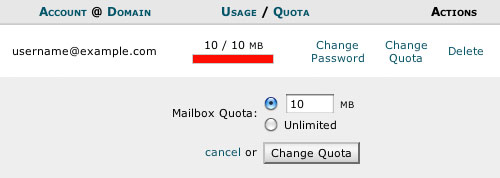
2. You can then go to Email Accounts and either delete emails to decrease the Disk Space size of what has been stored,
or you can increase the Disk Quota storage by selecting Change Quota.
3. Now, when you send out email it will be delivered.
Additional Notes:
If there appears to be no emails, yet the account is showing a Disk Quota, you can follow this article to correct the problem: Change the Mailbox (Size) Quota.
For errors such as:
Please see knowledgebase article: Sending Emails Generates Error: 503 valid RCPT command must precede DATA.
- 503 valid RCPT command must precede DATA
Knowledgebase Article
 117,568 views
 bookmark
 share
share
 tags: email exceeded mailbox outlook receiving send unable
(updated 1043 days ago)
tags: email exceeded mailbox outlook receiving send unable
(updated 1043 days ago)
117,568 views
bookmark
share
 E-mail
 Twitter
 Google Bookmarks
 Facebook
 MySpace
 Digg
Digg Reddit
 Delicious
 LinkedIn
 StumbleUpontags: email exceeded mailbox outlook receiving send unable
(updated 1043 days ago)
StumbleUpontags: email exceeded mailbox outlook receiving send unable
(updated 1043 days ago)
Recommended Help Content
Microsoft Outlook supports third party plugins (aka add-ins) to allow for such things as email virus scanning. Such plugins can cause problems, such as causing Outlook to time-out when trying to retri (updated 1417 days ago)
When setting up an account in Outlook or Outlook Express I get an error saying unable to connect to my SMTP server. (updated 581 days ago)
I send an email to one person and then do a carbon copy (Cc) to multiple other people. Not everyone is receiving the email, even when I try using blind carbon copy (Bcc). (updated 44 days ago)
Knowledgebase Article
53,817 views
tags: blind carbon carboncc copy email mail multiple partial people persons receive receiving
53,817 views
tags: blind carbon carboncc copy email mail multiple partial people persons receive receiving
Related Help Content
You can try sending the email on port 26, which is an alternate SMTP port and see if that works for you. For outlook: (updated 92 days ago)
Where do I Add, Delete and Manage Email Accounts? (updated 734 days ago)
Knowledgebase Article
174,464 views
tags: accounts add change client configure delete email imap macmail mail mailbox manage outlook password ports thunderbird
174,464 views
tags: accounts add change client configure delete email imap macmail mail mailbox manage outlook password ports thunderbird
How to access your email accounts from your web browser. Our webmail applications make a nice alternative to a desktop email client. (updated 135 days ago)
Why do I receive error "503 valid RCPT command must precede DATA" when attempting to send email? (updated 1121 days ago)
Can I send an email with large files/attachments? (updated 596 days ago)
Knowledgebase Article
57,583 views
tags: attachment attachments email files large limit send sending
57,583 views
tags: attachment attachments email files large limit send sending
Where do I Change my Mailbox (Size) Quota? How do I Increase or Decrease Mailbox (Storage) Quota? (updated 391 days ago)
Explanantion as to what causes this the happen and how to fix it. (updated 197 days ago)