
Just Host Web Hosting Help
Download a full cPanel backup using the Site Backup & Restore tool
Problem:
How do I download a full backup of my Just Host account?
Solution:
To backup your files and folders you can use the Site Backup and Restore tool, located in the Files category within your cPanel.
Login to your Just Host account.
Click the Site Backup & Restore tool.
Select the "Backup" tab.
Click "Full cPanel Backup"
Choose the date of the backup you wish to use
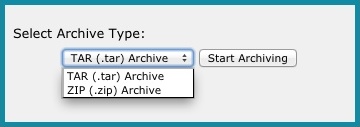
Choose if you will use "TAR (.tar)" or "ZIP (.zip)" archive
33,291 views
bookmark
share
tags: backup cpanel email restore site (updated 293 days ago)
Recommended Help Content
How to restore Email Filters the Site Backup & Restore tool (updated 383 days ago)
How to backup Email Filters the Site Backup & Restore tool (updated 383 days ago)
How to restore Email Messages the Site Backup & Restore tool (updated 744 days ago)
Related Help Content
How to restore individual files or folders with the Site Backup & Restore tool (updated 744 days ago)
How to restore a backup created using the Site Backup & Restore tool (updated 744 days ago)
How to backup all of your MySQL databases using the Site Backup & Restore tool (updated 744 days ago)
How to restore MySQL databases using the Site Backup & Restore tool (updated 610 days ago)
How to backup a MySQL database using the Site Backup & Restore tool (updated 383 days ago)
How to backup PostgreSQL databases using the Site Backup & Restore tool (updated 383 days ago)
How to restore MySQL databases using the Site Backup & Restore tool (updated 383 days ago)
How to restore PostgreSQL databases using the Site Backup & Restore tool (updated 383 days ago)

 E-mail
 Twitter
 Google Bookmarks
 Facebook
 MySpace
 Digg
Digg Reddit
 Delicious
 LinkedIn
 StumbleUpon