
Just Host Web Hosting Help
How to setup a Cron job
Summary
This article will explain what is a Cron Job and how to create one.
What is a cron job
Cron jobs allow you to automate certain commands or scripts on your server to complete repetitive tasks automatically. A cron job allows you to run a certain command at times set by the job. For example, you could set a cron job to delete temporary files every week so that your disk space is not being used up by those files.
Warning! It is important that you familiarize yourself with how cron jobs work. You need to have a good knowledge of Linux commands before you can use cron jobs effectively, especially when using the "Advanced (Unix Style)." Check your script with your hosting administrator before adding a cron job. Before you get started, please view the following web pages to learn more about Cron Jobs:
http://en.wikipedia.org/wiki/Cron (Basic)
http://www.unixgeeks.org/security/newbie/unix/cron-1.html (Advanced)
Setup a Cron
- Log into your Just Host Control Panel.
- Navigate to the Advanced section.
- Click Cron jobs.
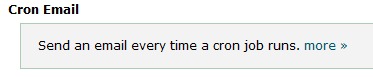
- The Cron Email section will send an email out after the Cron has finished.
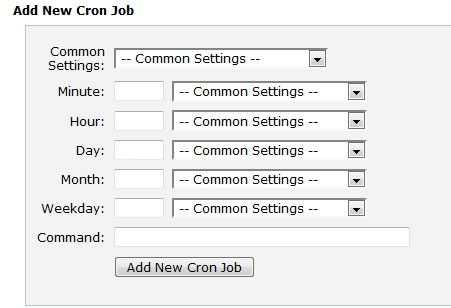
- Common Settings include every minute to once a year.
- Enter in the desired Command and click Add New Cron Job button.

Video "How-to" Tutorial
 87,792 views
 bookmark
 share
share
 tags: cpanelutilities cron
(updated 381 days ago)
tags: cpanelutilities cron
(updated 381 days ago)
87,792 views
bookmark
share
 E-mail
 Twitter
 Google Bookmarks
 Facebook
 MySpace
 Digg
Digg Reddit
 Delicious
 LinkedIn
 StumbleUpontags: cpanelutilities cron
(updated 381 days ago)
StumbleUpontags: cpanelutilities cron
(updated 381 days ago)
Recommended Help Content
This article will explain how to setup, remove, or edit a Cron Job. (updated 194 days ago)
Script executed with a cron job requires a specific php.ini file to be used. (updated 199 days ago)
Knowledgebase Article
60,559 views
tags: command cron cronjob crontab custom line optimizer php zend
60,559 views
tags: command cron cronjob crontab custom line optimizer php zend
How to backup the website files using the Site Backup & Restore tool (updated 742 days ago)
Related Help Content
How do I upload my web site? (updated 574 days ago)
This article will explain how to run php and other file types using Cron jobs. (updated 187 days ago)
Redirects allow you to make a specific web page redirect to another page and display the contents of that page. Learn how to setup a Permanent (301 or Termporary (302) redirects. (updated 636 days ago)
How do I publish my Web site using Publisher? (updated 423 days ago)
These steps will help you setup FrontPage® to be compatible with different web browsers and to be able to publish using FTP, so that you don't have to rely on the FrontPage® extensions. Select Tool (updated 42 days ago)
How to run cron jobs at a specific "local" date and time. (updated 385 days ago)
I created a website using BlueVoda and now I want help publishing it. (updated 1378 days ago)