
Just Host Web Hosting Help
Redirecting Web Pages
Summary
The Redirects tool will allow you to redirect your domain names.
How to setup a Redirect
- Login to your Just Host cPanel account.
- Click the Redirects icon, in the Domains section of the cPanel.

301 or 302 Redirect
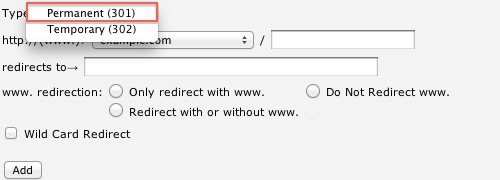
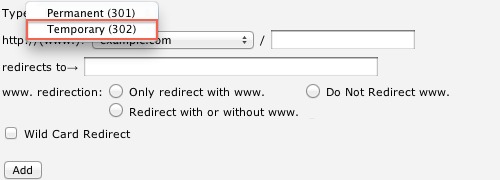
- From the Type menu you will need to choose which type of redirect to use.
- Permanent 301: A 301 redirect will update the visitors bookmarks and direct search engines to the new site.
- Temporary 302: A 302 redirect will redirect the visitor or search engine, but will not update the bookmark and the search engine will continue to index to the original page.
Url to Redirect
- Choose your domain name you would like to redirect, using the drop-down menu.
- If you would like to redirect a single page or directory; you can use the text field following the drop-down menu to enter the name of the folder or file.

Destination URL
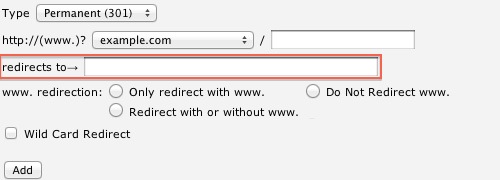
- Enter the full URL of the page you will be redirecting to in the "redirects to ->" text field.
Note: You need to enter the protocol as well, e.g. http://, https:// or ftp://
WWW Redirect options
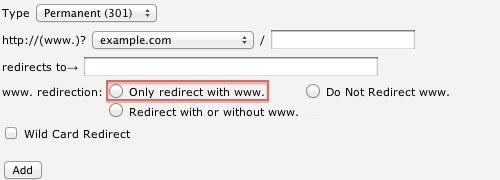
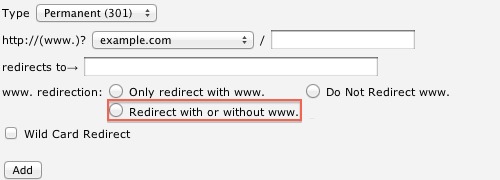
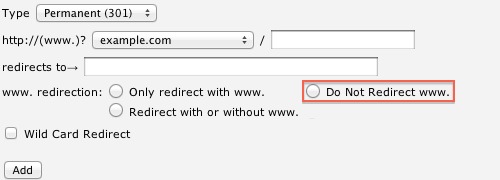
- Select if you will be redirecting www. or not.
- "Only redirect with www."This option will only redirect visitors that use www. as part of the URL
- "Redirect with or without www."This option will redirect all visitors.
- "Do Not Redirect www."This option will not redirect visitors that use www. as part of the URL
Wild Card Redirect
- Click the "Wild Card Redirect' if you would like to redirect to the same file on the new destination.
Example: www.example.com redirects to www.example-destination.com
- With "Wild Card Redirect": www.example.com/about.html will redirect to www.example-destination.com/about.html
- Without "Wild Card Redirect": www.example.com/about.html will redirect to www.example-destination.com
- Click the "Add" button to create the redirect.
Video "How-to" Tutorial
 136,180 views
 bookmark
 share
share
 tags: cpanel cpanelutilities domain forward redirect
(updated 636 days ago)
tags: cpanel cpanelutilities domain forward redirect
(updated 636 days ago)
136,180 views
bookmark
share
 E-mail
 Twitter
 Google Bookmarks
 Facebook
 MySpace
 Digg
Digg Reddit
 Delicious
 LinkedIn
 StumbleUpontags: cpanel cpanelutilities domain forward redirect
(updated 636 days ago)
StumbleUpontags: cpanel cpanelutilities domain forward redirect
(updated 636 days ago)
Recommended Help Content
How do I redirect users to another page using PHP? (updated 1050 days ago)
If suddenly when you go to your page, you get nothing on the page. You can still get HTML to display, just not PHP. To serve HTML pages to browsers, we don't associate the Apache processes with your 2 (updated 1426 days ago)
How do I create a redirect? (updated 636 days ago)
Related Help Content
The redirection of www.yourdomain.com/default.html or index.html to http://www.yourdomain.com/index.php?act=whatever redirects it to http://www.yourdomain.com/index.php%3fact=whatever In other words, (updated 496 days ago)
Knowledgebase Article
80,690 views
tags: htaccess messing mod php redirect redirects rewrite variable variables
80,690 views
tags: htaccess messing mod php redirect redirects rewrite variable variables
Learn how to purchase, or register, additional domain names. (updated 935 days ago)
Learn how the Cron tool can help you automate the scripts on your web site. (updated 381 days ago)
I would like to view the statistics for my website. (updated 395 days ago)
Knowledgebase Article
79,961 views
tags: addon domain enable hits set setup statistics stats subdomain visitors web
79,961 views
tags: addon domain enable hits set setup statistics stats subdomain visitors web
This article explains error pages and how they can be customized. (updated 194 days ago)
How do I make a sub directory (or sub folder) act as the public_html for your main domain? (updated 397 days ago)
How do I perform a URL redirect/rewrite using the .htaccess file? (updated 365 days ago)
As the registrar, we will assist in the following domain dispute, providing the specific criteria is met. The domain has been moved without the domain owner's consent by means of the password or EPP c (updated 553 days ago)
Knowledgebase Article
53,798 views
tags: dispute domain epp icann moved owners ownership permission policy proof
53,798 views
tags: dispute domain epp icann moved owners ownership permission policy proof