
Just Host Web Hosting Help
How many files are on my account?
- Login to your Control Panel.
- Click the Server quicklink.
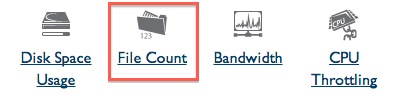
- Click File Count to view the total number of files on your account.

 bookmark
 share
share
 E-mail
 Twitter
 Google Bookmarks
 Facebook
 MySpace
 Digg
Digg Reddit
 Delicious
 LinkedIn
 StumbleUpon
Recommended Help Content
There are many ways that you can transfer files and folder to and from your hosting account. We highly recommend using an FTP (File Transfer Protocol) program to quickly upload and download files. We (updated 393 days ago)
Learn how to create an email account associated with your domain name (updated 84 days ago)
How to restore individual files or folders with the Site Backup & Restore tool (updated 743 days ago)
Related Help Content
This article will walk you through extracting compressed files using the File Manager. (updated 189 days ago)
How to use use the FTP Account tool to create additional FTP Accounts. This is useful for granting FTP access to your account without giving anyone your cPanel password. (updated 455 days ago)
Video "How-to" Tutorial
 282,630 views
 tags: account accounts cpanelutilities ftp login publish upload
282,630 views
tags: account accounts cpanelutilities ftp login publish upload
How to create a new cPanel. (updated 1 day ago)
This article will walk you through copying and moving files using the File Manager. (updated 203 days ago)
How do I log into cPanel securely? (updated 1419 days ago)
This article will walk you through uploading files using the File Manager (updated 196 days ago)
How to backup the website files using the Site Backup & Restore tool (updated 743 days ago)
How to restore the website files using the Site Backup & Restore tool (updated 743 days ago)