
Just Host Web Hosting Help
How to access your email with Gmail
Summary
You are able to setup your Gmail account to send and receive emails from your email accounts on your Just Host account.
Incoming Mail (POP3)
- Login to your Gmail Account.
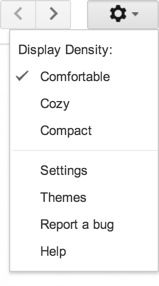
- Choose Settings, from the Settings cog.
- Click Accounts and Import.
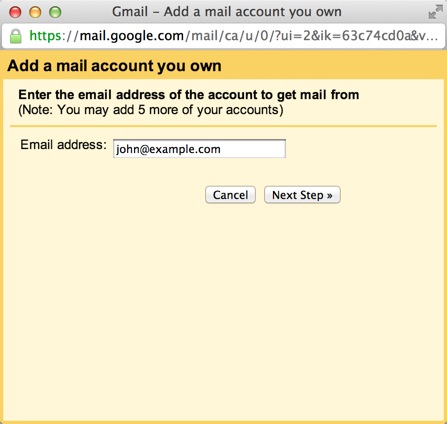
- Click 'Add a POP3 mail account you own".
- Enter your Email address.
- Click the Next button.
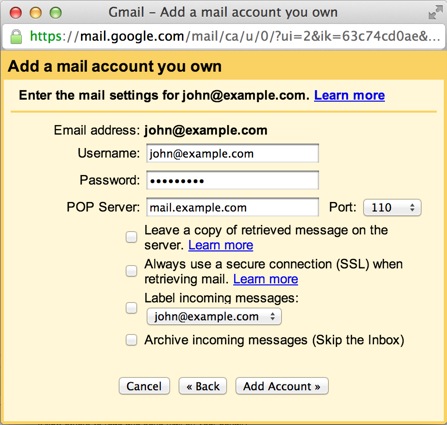
- Enter your full email address as the Username.
- Enter Password for your email account.
- Enter the POP Server. This will be your domain name proceeded by "mail."
- Choose any additional options you may want
- Click the Add Account button.
Outgoing Mail (SMTP)
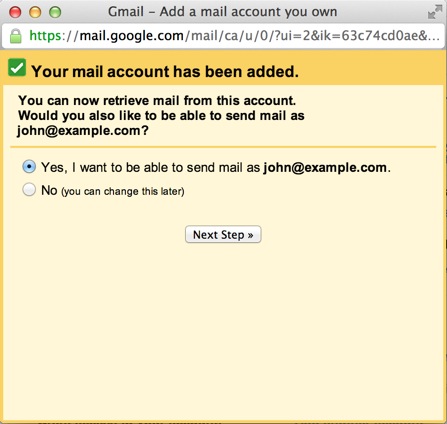
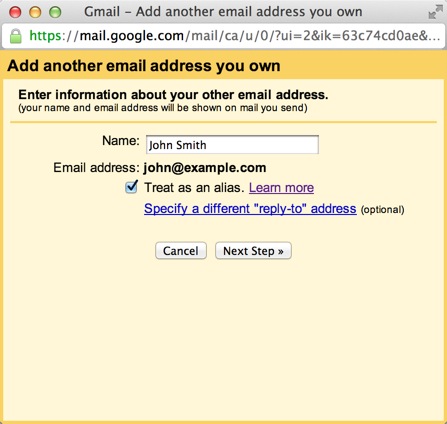
- Choose " Yes, I want to be able to send mail as john@example.com"
- Choose if you will use this address as an Alias.
To learn more about Aliases in Gmail please see Googles Knowledge Base Article
- Click the Add account button.
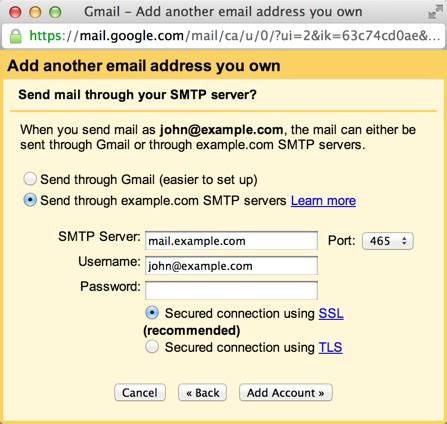
- Choose to send "Send through example.com SMTP server"
- Enter the SMTP Server. This will be your domain name procded by "mail."
- Enter your full email address as the Username.
- Enter Password for your email account.
- Choose Port 25 (Non SSL) or 465 (SSL).
Video "How-to" Tutorial
 793,402 views
 bookmark
 share
share
 tags: email gmail mail webmail
(updated 27 days ago)
tags: email gmail mail webmail
(updated 27 days ago)
793,402 views
bookmark
share
 E-mail
 Twitter
 Google Bookmarks
 Facebook
 MySpace
 Digg
Digg Reddit
 Delicious
 LinkedIn
 StumbleUpontags: email gmail mail webmail
(updated 27 days ago)
StumbleUpontags: email gmail mail webmail
(updated 27 days ago)
Recommended Help Content
Learn how to check your email accounts from within Yahoo! Mail. This tutorial will show you how to setup a POP account in Yahoo! Mail. (updated 920 days ago)
How to access your email accounts from your web browser. Our webmail applications make a nice alternative to a desktop email client. (updated 118 days ago)
We provide several programs to be able to check your email online. cPanel Mail section where Email Accounts icon is located Navigate to the Mail section inside cPanel. Click the Email Accounts icon. (updated 26 days ago)
Related Help Content
Learn how to create an email account associated with your domain name (updated 69 days ago)
How to Configure Eudora Pro to Access Email? (updated 1378 days ago)
Windows Live Mail combines the ease of use of Outlook Express, with the speed of Windows Live. This tutorial will show you how to setup your email account in Windows Live Mail. (updated 921 days ago)
Where do I Add, Delete and Manage Email Accounts? (updated 717 days ago)
Knowledgebase Article
172,240 views
tags: accounts add change client configure delete email imap macmail mail mailbox manage outlook password ports thunderbird
172,240 views
tags: accounts add change client configure delete email imap macmail mail mailbox manage outlook password ports thunderbird
To setup an email address for your domain name is easily accomplished within the control panel (cPanel). Mail section where Email icon is located Navigate to the Mail section inside cPanel. Click the (updated 77 days ago)
How can I remotely access my e-mail? (updated 717 days ago)
How do I use webmail? (updated 118 days ago)
Just Host offers numerous email options. (updated 717 days ago)