
Just Host Web Hosting Help
Setup an FTP disk in Windows Vista and 7
Summary
Windows will allow you to setup a Network Folder via FTP, this will act like a local hard drive or flash drive and allow you to drag and drop file and folders between the server and your computer.
Setup a Network Folder in Windows Vista / 7
Windows Vista and 7 have a built-in functionality to allow FTP connections to remote servers, without having to download another 3rd party program. This is a useful feature, as it creates a "network folder" that can be quickly accessed from a shortcut, your Computer menu, or from your Network Places, as well as providing "drag and drop" upload functionality.
To configure this properly, you will need a working FTP username. You may use either your cPanel username and cPanel password. Alternatively you may create an FTP account from your cPanel interface, using the "FTP Accounts" tool in the "Files" category, as shown in our article: Create an FTP Account.
- Go to your Computer. This may be accessed from your Windows menu at the bottom left, or it may be a desktop shortcut.
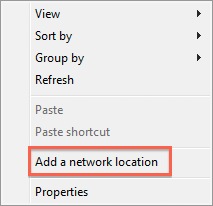
- Right-click in any blank space. Select "Add a Network Location".
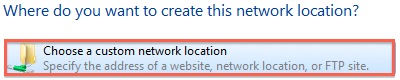
- Click "Next," then select "Choose a custom network location."
- You will then be prompted for the "Internet or network address." Enter your domain name, with the ftp:// prefix.
 Example: ftp://example.com/
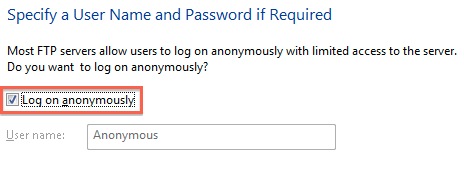
 - The next step will ask you to "Specify a User Name and Password if Required." Un-check the box "Log on anonymously,"
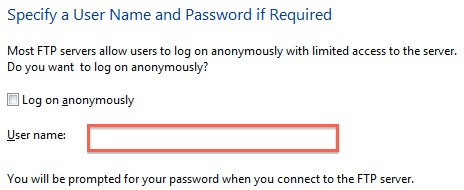
- Enter your FTP username. In this example, we will specify our cPanel username, which doesn't require the "@domain.com" suffix.
- You will be prompted to enter a name for the network location. You may call this whatever you'd like.
- Lastly, you will be asked if you wish to make a shortcut for this. If you do not choose to make a Desktop shortcut, you can still access it from your Computer menu. Select "Finish."


Knowledgebase Article
 20,466 views
 bookmark
 share
share
 tags: ftp vista webdav webdisk windows
(updated 196 days ago)
tags: ftp vista webdav webdisk windows
(updated 196 days ago)
20,466 views
bookmark
share
 E-mail
 Twitter
 Google Bookmarks
 Facebook
 MySpace
 Digg
Digg Reddit
 Delicious
 LinkedIn
 StumbleUpontags: ftp vista webdav webdisk windows
(updated 196 days ago)
StumbleUpontags: ftp vista webdav webdisk windows
(updated 196 days ago)
Recommended Help Content
This article will explain how to access and use the Web Disk and cPanel as well as explain variations for different operating systems. (updated 192 days ago)
How to set up WebDisk utilizing the Just Host Public SSL: (updated 390 days ago)
I want to be able to provide an FTP link to my site that does not use Unlimited FTP or Anonymous FTP. (updated 397 days ago)
Related Help Content
How do I create a FTP account, and quickly set it up in my client? (updated 561 days ago)
How do I setup CuteFTP 8.2 for FTP? (updated 425 days ago)
I would like to use FileZilla how do I go about the setting it up and connecting to my site? (updated 425 days ago)
Knowledgebase Article
178,641 views
tags: client configure file filezilla ftp party set settings setup zilla
178,641 views
tags: client configure file filezilla ftp party set settings setup zilla
How to use use the FTP Account tool to create additional FTP Accounts. This is useful for granting FTP access to your account without giving anyone your cPanel password. (updated 456 days ago)
Video "How-to" Tutorial
282,888 views
tags: account accounts cpanelutilities ftp login publish upload
282,888 views
tags: account accounts cpanelutilities ftp login publish upload
There are many ways that you can transfer files and folder to and from your hosting account. We highly recommend using an FTP (File Transfer Protocol) program to quickly upload and download files. We (updated 394 days ago)
This article will explain how to connect to your server via FTP using Windows Explorer. (updated 196 days ago)
Knowledgebase Article
2,597 views
tags:
2,597 views
tags:
Learn how to find out how much of the unlimited disk space you have used. (updated 383 days ago)
Windows Live Mail combines the ease of use of Outlook Express, with the speed of Windows Live. This tutorial will show you how to setup your email account in Windows Live Mail. (updated 936 days ago)