
Just Host Web Hosting Help
Create/Add Email Accounts.
Summary
To setup an email address for your domain name is easily accomplished within your justhost Control Panel.
Create a new Email Address
- Login to your Control Panel.
- Click the Email icon.
- Enter the email address you desire.
- Enter a secure password and type it again.
- Click the Create Account button.

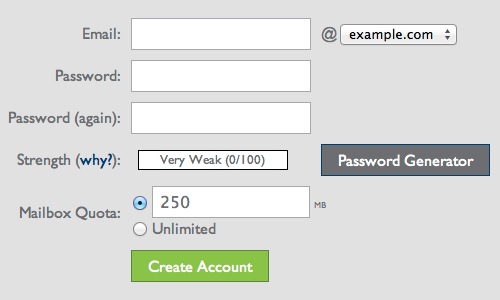
Your email address has been setup. You may close the confirmation message and begin using your email address.

 bookmark
 share
share
 E-mail
 Twitter
 Google Bookmarks
 Facebook
 MySpace
 Digg
Digg Reddit
 Delicious
 LinkedIn
 StumbleUpon
Recommended Help Content
Where in the cPanel do I delete email accounts, and how can I do this? (updated 190 days ago)
Where do I Add, Delete and Manage Email Accounts? (updated 735 days ago)
Knowledgebase Article
 174,574 views
 tags: accounts add change client configure delete email imap macmail mail mailbox manage outlook password ports thunderbird
174,574 views
tags: accounts add change client configure delete email imap macmail mail mailbox manage outlook password ports thunderbird
Learn how to create an email account associated with your domain name (updated 86 days ago)
Related Help Content
How to create and access your email accounts (updated 119 days ago)
We provide several programs to be able to check your email online. cPanel Mail section where Email Accounts icon is located Navigate to the Mail section inside cPanel. Click the Email Accounts icon. (updated 44 days ago)
How to use use the FTP Account tool to create additional FTP Accounts. This is useful for granting FTP access to your account without giving anyone your cPanel password. (updated 457 days ago)
Video "How-to" Tutorial
283,227 views
tags: account accounts cpanelutilities ftp login publish upload
283,227 views
tags: account accounts cpanelutilities ftp login publish upload
Trying to send out emails from multiple email accounts fail from both webmail and third party email clients. Possible Reasons: The maximum emails per hour has been exceeded. This can be caused by forw (updated 1044 days ago)
To setup an email address for your domain name is easily accomplished within the control panel (cPanel). Mail section where Email icon is located Navigate to the Mail section inside cPanel. Click the (updated 94 days ago)
The most common cause is that you are either sending to or sending from an invalid email address. You will want to create a new email address, and change your profile to use a different Email address. (updated 1422 days ago)
Learn how to check your email accounts from within Gmail. This tutorial will show you how to setup a POP account in GMail. (updated 44 days ago)
Explanation why the error occurs in Browser and solutions (updated 198 days ago)