
Just Host Web Hosting Help
Using Apple's Mail Application
If you are using a Mac, you can manage your mail through the Mac based email application Mail; this application is also known as "Mac Mail".
- Select the 'Mail' menu.
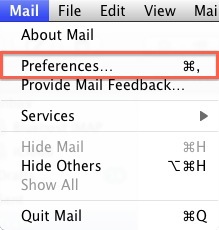
- Select Preferences.
- Click on the Accounts tab.
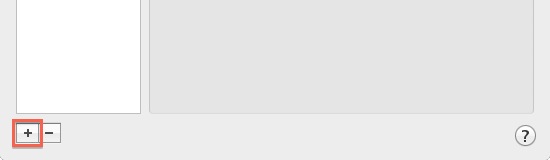
- On the Accounts window, click the + sign.
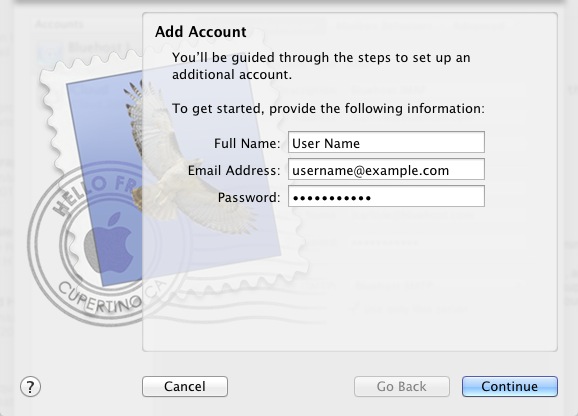
- Please enter your name, as you want it to appear on your outbound E-mail messages.
- Please type your E-mail address.
- Enter your E-mail password.
- Click the Next button.
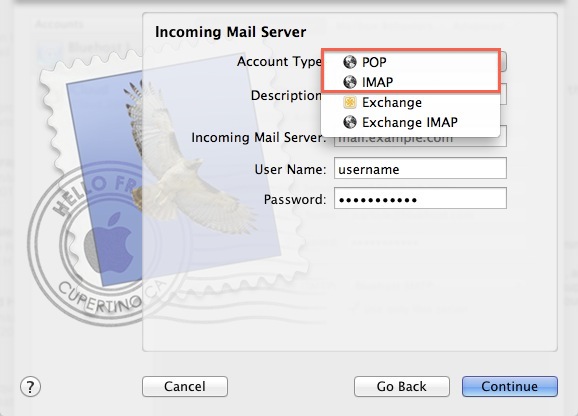
- Please choose your account type. You may select either POP or IMAP. Click here for an explanation on the differences between POP3 and IMAP.
- Give this account a description for quick reference.
- Please enter mail. followed by your domain name as the Incoming and Outgoing mail server.
- Enter your E-mail password.
- Click Next.
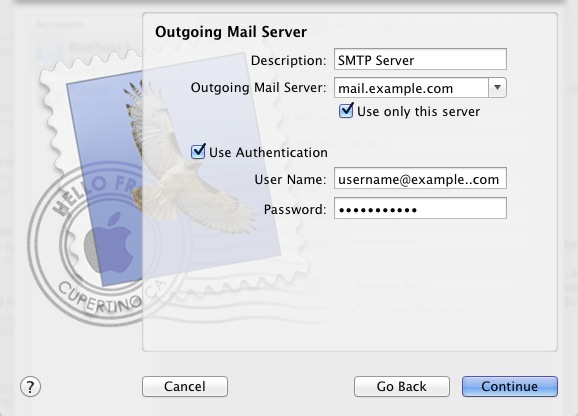
- Please give your Outgoing Mail Server a description.
- The Outgoing Mail Server is the same as your incoming mail server. Again, this will be something like mail.example.com
- Be sure that the Use Authentication box is checked.
- Enter your E-mail address for the User Name.
- Please type in your E-mail password.
- Click the Next button.
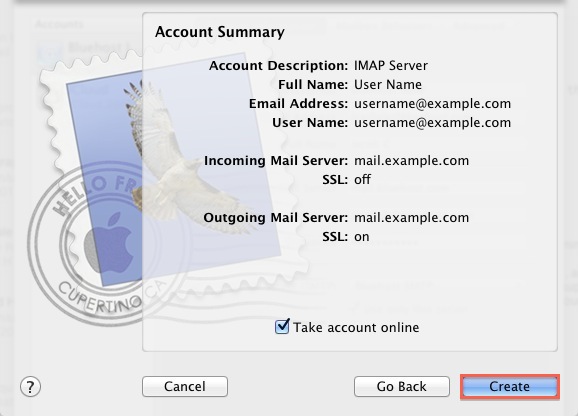
Removing an Email account
WARNING: Removing an account in
Mail will permanently delete its mailboxes, messages, notes, and to do items. If you want to keep those, be sure to copy them to an On My
Mailbox before deleting the account.
Exchange, IMAP, and MobileMe accounts store their mailboxes and messages on the server; deleting these account types in Mail will not permanently delete messages from the server. However, if you are not completely certain that your account is one of those types, be sure to copy the mailboxes and messages you want to keep into an On My Mailbox, or save individual messages manually by selecting them and choosing Save As from the File menu.
Apple's Basic Troubleshooting Guide
Apple's Email Configuration Guide (see Removing an email account)
Video "How-to" Tutorial
 200,249 views
 bookmark
 share
share
 tags: apple email imap macmail mail
(updated 573 days ago)
tags: apple email imap macmail mail
(updated 573 days ago)
200,249 views
bookmark
share
 E-mail
 Twitter
 Google Bookmarks
 Facebook
 MySpace
 Digg
Digg Reddit
 Delicious
 LinkedIn
 StumbleUpontags: apple email imap macmail mail
(updated 573 days ago)
StumbleUpontags: apple email imap macmail mail
(updated 573 days ago)
Recommended Help Content
All of my email folders are missing. How can I get them to show up? (updated 1350 days ago)
To setup an email address for your domain name is easily accomplished within the control panel (cPanel). Mail section where Email icon is located Navigate to the Mail section inside cPanel. Click the (updated 174 days ago)
How to add an email in Mail (Mac Mail) (updated 341 days ago)
Related Help Content
How to Configure Eudora Pro to Access Email? (updated 1758 days ago)
Where do I Add, Delete and Manage Email Accounts? (updated 1097 days ago)
Knowledgebase Article
225,474 views
tags: accounts add change client configure delete email imap macmail mail mailbox manage outlook password ports thunderbird
225,474 views
tags: accounts add change client configure delete email imap macmail mail mailbox manage outlook password ports thunderbird
There are many third-party E-mail programs that can be used to connect to your E-mail accounts from remote computers. The most common E-mail programs, called Clients, are Outlook, Mac Mail, and Mozil (updated 573 days ago)
Learn how to check your email accounts from within Yahoo! Mail. This tutorial will show you how to setup a POP account in Yahoo! Mail. (updated 303 days ago)
Configuring your email client: Outlook Express. (updated 314 days ago)
Knowledgebase Article
190,891 views
tags: configuration configure email express imap outlook pop setup
190,891 views
tags: configuration configure email express imap outlook pop setup
How Do I Subscribe to IMAP Folders in Mac OS X Mail Client? (updated 994 days ago)
I want to save my sent email using Outlook or Outlook Express to the server. (updated 1778 days ago)
Just Host offers numerous email options. (updated 225 days ago)