Analyzing Omniture Image Request Length
by usujason on 8/11/10
Last week I saw several Tweets about the best way to determine the Omniture Image Request length. I'm not sure this is the "best way", but this is a simple bookmark that I created to return the size of the request being sent to Omniture.
javascript:alert(eval('s_i_'+s.visitorNamespace+'.src.length'));
NOTE: This code only works for 'H Code' using the standard 'S Object'.
The bookmark is used in the same way that your standard Omniture debugger is used. To add this bookmark.
1. Using any webpage, create a new bookmark.
2. Edit the bookmark you just created.
3. Delete all the text from the URL field.
4. Paste the above code into the URL field.
5. Click 'ok'
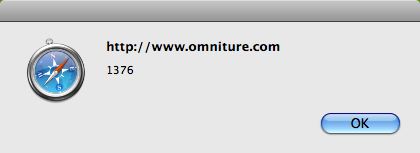
Now you can simply navigate to any of your site page and click the bookmark:
 Why is this important?
It used to be that a long URL was only a problem for sites with big shopping carts, today that is no longer the case. With companies becoming more sophisticated in their web analytics practice, they are capturing and sending more and more information on every page view.
That information is sent to your analytics provider, in this case Omniture, via a URL. Each browser has a set limit for how long a URL can be and the lowest common denominator seems to be Internet Explorer at 2083 characters. That means, if you are sending large chunks of data to Omniture, over 2083 characters, there is a chance that some of that data will be lost.
Let's take it a step further.
The above code is simply a snapshot in time. As web pages are dynamic, so are web site visitors. Perhaps, depending on who I am, what I've done before, if I've logged in to the site or not, there may be more or less information to send about me. The bookmark gives you an idea but to get the full picture, we will need to capture and report on this data within Omniture SiteCatalyst.
Here is how I deployed the tracking for this blog:
1. Added a block of code, AFTER, my standard Omniture page code. This block captures the current page name and image request length and writes the values to a cookies.
2. Added a block of code to my s_code.js file, in the s_doPlugins function, to read the cookie and write the values to two custom insight variables.
	if (s.c_r('omtrLen')){
		getOmtrLen = s.c_r('omtrLen');
		var mySplitResult = getOmtrLen.split(":");
		var myPageName = mySplitResult[1];
		var myImageLen = mySplitResult[0];

		s.prop6 = myPageName;
		s.prop7 = myImageLen;
	}
3. Created a 2-Item correlations between my two (page and image length) Custom Insight variables.
NOTE: I am capturing page name in a Custom Insight as I am calculating the length of the image request length AFTER the omniture code has executed. So, my two options are 1) pass the values on the next page, similar to how ClickMap works or 2) on the same page using a Custom Link call (costing me more money) but in either case, I'll need to rely on capturing the page name in a variable other than s.pageName.
Now you can analyze your data. Here are a few ideas:
1. Run the "Page" report (in my report suite this is prop6) and pick a high volume page. Break the page down by "Image Length" and look for values > 2083
2. Run the "Image Length" report and look for vlaues > 2083 and break them down by "Page" to find the offending pages.
3. If you have a large number of entries and this is a report you will run on say a monthly basis, it may make sense to classify your results. I'm classifying my data into three buckets. This is easy to do by exporting Image Lengths and assigning the buckets using a simple Excel Worksheet.
Bucket 1 (<=1800): SAFE
Bucket 2 (>1800 and =< 2082): WARNING
Bucket 3 (>= 2083): ERROR
Jason Thompson is a Senior Analytics Consultant at Numeric Analytics. You can follow him on Twitter at http://twitter.com/usujason. Please send questions and comments to jthomp [at] gmail [dot] com.
 Why is this important?
It used to be that a long URL was only a problem for sites with big shopping carts, today that is no longer the case. With companies becoming more sophisticated in their web analytics practice, they are capturing and sending more and more information on every page view.
That information is sent to your analytics provider, in this case Omniture, via a URL. Each browser has a set limit for how long a URL can be and the lowest common denominator seems to be Internet Explorer at 2083 characters. That means, if you are sending large chunks of data to Omniture, over 2083 characters, there is a chance that some of that data will be lost.
Let's take it a step further.
The above code is simply a snapshot in time. As web pages are dynamic, so are web site visitors. Perhaps, depending on who I am, what I've done before, if I've logged in to the site or not, there may be more or less information to send about me. The bookmark gives you an idea but to get the full picture, we will need to capture and report on this data within Omniture SiteCatalyst.
Here is how I deployed the tracking for this blog:
1. Added a block of code, AFTER, my standard Omniture page code. This block captures the current page name and image request length and writes the values to a cookies.
Why is this important?
It used to be that a long URL was only a problem for sites with big shopping carts, today that is no longer the case. With companies becoming more sophisticated in their web analytics practice, they are capturing and sending more and more information on every page view.
That information is sent to your analytics provider, in this case Omniture, via a URL. Each browser has a set limit for how long a URL can be and the lowest common denominator seems to be Internet Explorer at 2083 characters. That means, if you are sending large chunks of data to Omniture, over 2083 characters, there is a chance that some of that data will be lost.
Let's take it a step further.
The above code is simply a snapshot in time. As web pages are dynamic, so are web site visitors. Perhaps, depending on who I am, what I've done before, if I've logged in to the site or not, there may be more or less information to send about me. The bookmark gives you an idea but to get the full picture, we will need to capture and report on this data within Omniture SiteCatalyst.
Here is how I deployed the tracking for this blog:
1. Added a block of code, AFTER, my standard Omniture page code. This block captures the current page name and image request length and writes the values to a cookies.
As I understand it, if your image request exceeds 2083 characters in IE, not only is there a chance you will lose some of the data, the entire request will be dropped.
From my testing that is not the case, the truncated request is still sent and processed.
It's also worth pointing out that the "Netscape" plug-in string can waste - sorry, use up - a whole bunch of characters, but obviously that value doesn't get populated at all in IE. As a result, for any page you care to test, the Omniture string tends to be much shorter in IE than Firefox/Safari etc. So, if you're recording the string length as described above, it's worth tying it to the browser type (or deducting the length of the plugins variable), because that'll tell you if you've actually got a problem or not.
Must be logged in to comment. Login or register now to comment!