Understanding Test & Target's 'Deactivating an mBox' Functionality
by usujason on 7/28/10
As I was browsing the July 22, 2010 Product Release Notes from Omniture (Adobe Online Marketing Suite Powered by Omniture), one line stood out from all the rest.
Users with approver privileges can deactivate requests from specified mboxes, or activate previously deactivated
requests.
One of the biggest selling points that optimization vendors like to use is "once deployed, you can operate without IT involvement." However, in most scenarios, this just isn't reality with Omniture (Adobe Online Marketing Suite Powered by Omniture) Test & Target.
Without getting too much into the complexities of how Omniture bills for Test & Target, let's take the following scenario. Client has 3 primary conversion funnels that they would like to focus their optimization efforts on: Registration Funnel, Login/Home Page Funnel, Subscription Funnel. In order to truly operate without IT involvement, Test & Target code (mBoxes) must be deployed to each of the funnels and their corresponding conversion pages, however once completed, the client is billed for all traffic to all of the pages that contain Test & Target code, regardless of the presence of an active campaign or not.
As most organizations rarely test multiple funnels at the same time, this approach is not cost effective. So, to my delight, when I saw a new feature that allowed Test & Target admins to control the activation state of mBoxes, I was excited.
Before you run off to your boss exclaiming the good news, let me give you a bit of background on how and when mBoxes are deactivated. For all intents & purposes, when you deactivate an mBox within the Test & Target admin, the content pushed through the mBox is effectually turned off,
however, this does not mean you won't be billed for the execution of that mBox.(SEE UPDATE BELOW)
I conducted the following experiment, using a visitor who had previously been to the site and had seen content delivered via an mBox.
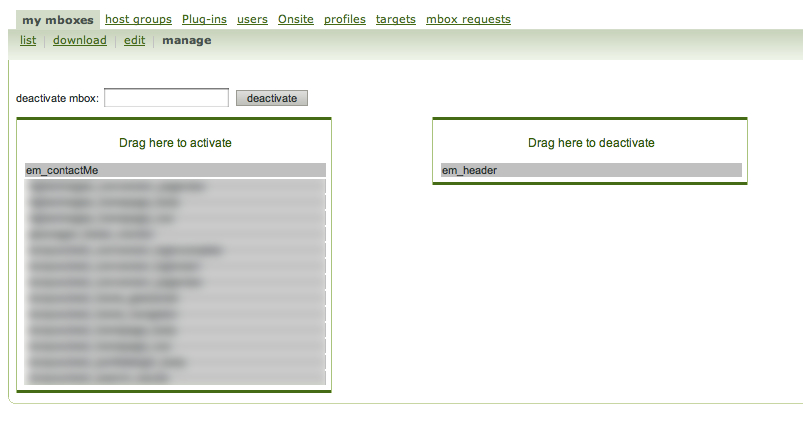
1. Deactivated a previously active mBox by dragging & dropping the mBox.

2. Viewed a page on my site that contained Test & Target code.
3. Using httpFox, I am able to test for the presence of an mBox request.
 What does this all mean? If a visitor had previously "seen" an mBox then they will continue to "see" (although they "see" the mBox from a billing perspective, they will not see the content that the mBox would have delivered) that mBox until either the Test & Target cookie expires (2 years from last session) or the cookie is deleted.(SEE UPDATE BELOW)
IMPORTANT UPDATE: Kimen Field, the Test & Target Product Manager, was kind enough to supply me with detailed information on how the deactivating functionality works. Although, as my testing has shown, the request is still sent out from the browser, when an mBox is deactivated, the request is killed when it hits the Test & Target load balancers and default content is served in the case of an active campaign.
Essentially, each hit is evaluated against the list of deactivated mBoxes. Those hits that match the deactivated list are tossed out and you are not billed for them.
Thanks for the update Kimen, I like this much better than how I had envisioned it working :)
So, this is far from a perfect solution but it is a major step in the right direction.
Jason Thompson is a Senior Analytics Consultant at Numeric Analytics. You can follow him on Twitter at http://twitter.com/usujason. Please send questions and comments to jthomp [at] gmail [dot] com.
 2. Viewed a page on my site that contained Test & Target code.
3. Using httpFox, I am able to test for the presence of an mBox request.
2. Viewed a page on my site that contained Test & Target code.
3. Using httpFox, I am able to test for the presence of an mBox request.
 What does this all mean? If a visitor had previously "seen" an mBox then they will continue to "see" (although they "see" the mBox from a billing perspective, they will not see the content that the mBox would have delivered) that mBox until either the Test & Target cookie expires (2 years from last session) or the cookie is deleted.(SEE UPDATE BELOW)
Must be logged in to comment. Login or register now to comment!